
Your dad still has the phone he's used for years, but he doesn't always hear it from the next room. His daughter wants him to be reachable when he's out, and he wants a phone that feels familiar. Then someone asks whether the household should keep its home phone, switch to a cell phone, or do both. It's a practical question, especially when the answer needs to work on an ordinary day and during an outage.
The useful question isn't home phone vs cell phone. It's which setup gives this person a dependable way to call, makes their location clear when needed, and fits their routine without adding needless frustration. "Home phone" can mean a traditional copper line, an internet-based service, or a wireless home-phone box, and those don't all behave alike.
| Phone setup | Where it works | What to check |
|---|---|---|
| Traditional copper landline | At its fixed location | Confirm it's actually copper, and ask how it behaves during a power outage |
| VoIP or cable home phone | At home, through internet or provider equipment | Check battery backup, broadband dependence, and emergency address details |
| Cell phone | At home and away, wherever service is available | Keep it charged, make sure the user can operate it, and know how to state the location |
Table of Contents
- Why the Home Phone vs Cell Phone Question Matters
- How Household Phone Use Has Changed
- Reliability and Emergency Calling Side by Side
- Power Outages, Storms, and What Still Works
- Staying Connected to Caregivers and Platforms
- Cost, Billing, and What Caregivers Overlook
- Matching the Phone to Real Life Scenarios
- A Friendly Decision Checklist and 30-Day Test
Why the Home Phone vs Cell Phone Question Matters
A daughter is helping her father in the kitchen when she realizes his familiar home phone cannot go with him to the garden or a neighbor's house. She has to decide whether to keep it, replace it, or add a cell phone. He wants to call comfortably and stay reachable, not learn a gadget for its own sake.
Make the decision around what works in his daily life. The setup should let him call from the places he goes, share his location with a dispatcher when needed, and stay in touch with family during an outage. Consider where he spends time, which equipment he can use confidently, and who needs to stay in touch. For families using caregiver platforms such as Rx360, check whether the person's phone can support the calls, texts, or app-based check-ins the family relies on.
A “home phone” may use a traditional copper line, internet equipment, or a wireless box. Those options depend on different networks and power sources. The Federal Communications Commission's June 2024 figures list 388 million mobile voice subscriptions, 18 million traditional switched-access lines, and 65 million interconnected VoIP subscriptions in the United States, in its FCC's telephone and 911 service information. A household can still have a home phone built on very different technology than the line a family used years ago.
Start with practical needs, not which device seems newer. Does he go out on his own? Are large physical buttons easier to use? Do caregivers check in by text or app? Should the home service work during a power outage, and what backup does it have? Choose a setup that answers those questions and supports his independence without pressuring him to adopt a device he finds difficult.
How Household Phone Use Has Changed
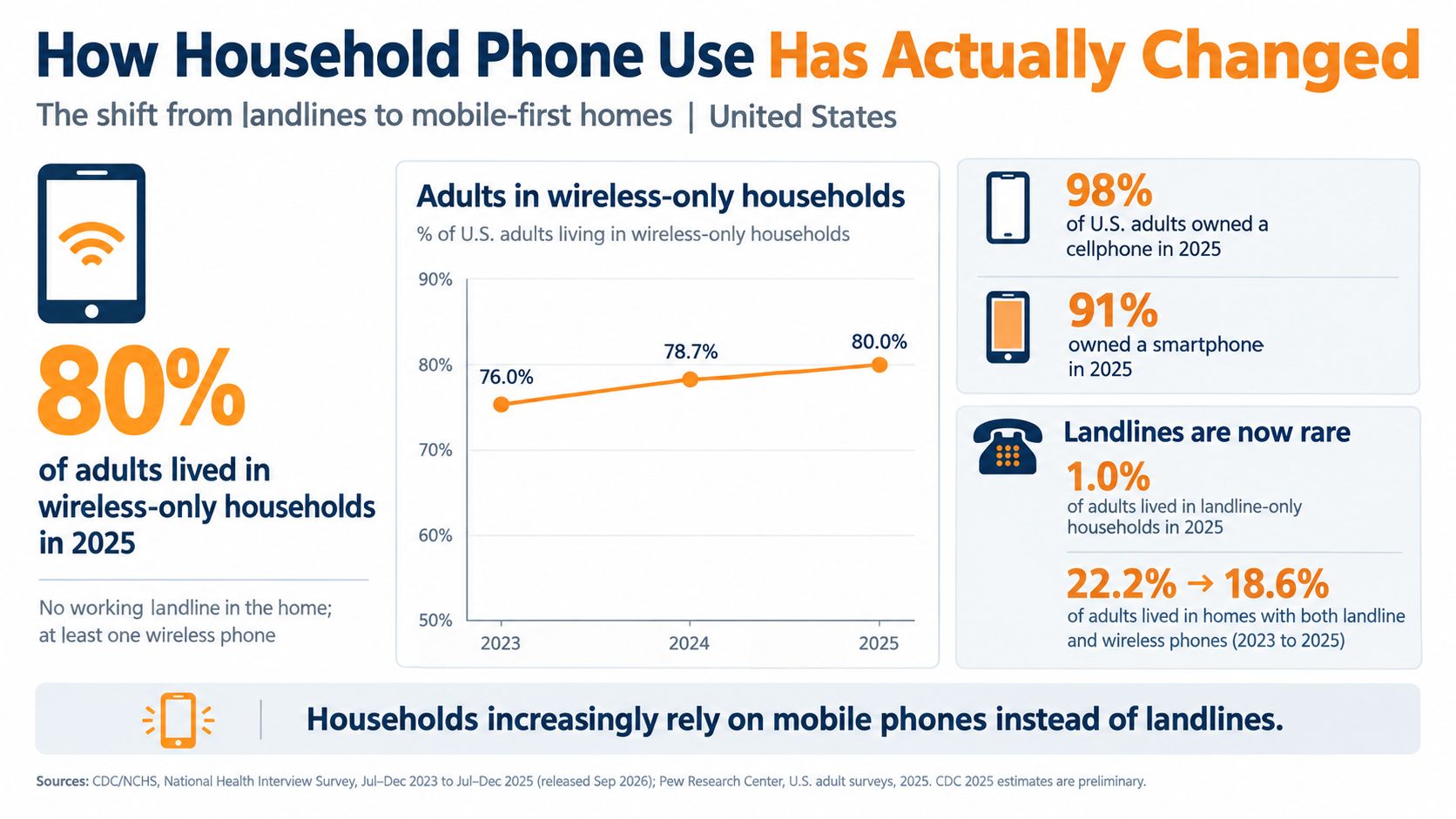
The CDC's National Health Interview Survey estimate for July through December 2024 found that 78.0% of adults lived in wireless-only households. Cellular service was present without a household landline. That does not mean every person in those homes owned or used a cell phone, or that landlines have disappeared. It does show that mobile service is now a common household arrangement.
Older adults use phones in varied ways, too. Figures cited by Life Assure's discussion of older adults' phone use indicate that 4.3% of adults 65 and older live in landline-only households, 74.6% rely primarily on mobile service, and 12.3% rely mostly or entirely on a landline. These figures describe different household setups, not one shared preference. Familiarity, home layout, confidence with controls, time spent away, and family routines all affect what works day to day.
“Home phone” can mean different things
A handset on a table could connect to a traditional copper line, cable or fiber voice service, or a wireless home-phone box. The handset's appearance does not reveal what network it uses or what happens if power or service is interrupted. The FCC lists interconnected VoIP separately from traditional switched-access lines, a useful reminder that a home phone can rely on internet-based technology.
For a household choosing a voice setup, the connection type matters as much as the handset. Copper, internet-based service, and cellular service differ in where they work, how callers' locations are determined, and what keeps them powered. Before replacing or canceling a service, identify how it connects and ask the provider what equipment and backup support it. Choose the setup that keeps the person reachable and fits their daily routine.
Reliability and Emergency Calling Side by Side
The FCC's explanation of dispatchable location describes the basic difference: wireline Enhanced 911 generally provides the caller's registered physical address to the public-safety answering point, while cellular E911 relies on location information determined through network and device technologies. FCC requirements generally target wireless location accuracy of approximately 50 to 300 meters, depending on the technology used. That's useful, but it isn't the same as a dispatcher being told exactly which apartment, floor, or room the caller is in.
A fixed phone has a practical advantage when the call comes from its registered address. A mobile phone has the advantage when the person is away from home, but the caller should be ready to describe where they are. For emergency calls, keep location services enabled on the cell phone and make sure the user knows how to say the street address and any details needed to find them. The FCC's wireless 911 overview explains that wireless emergency calling uses cell-site information and, where available and required, more precise location details. Location technologies can take time to establish a more exact position, so clear spoken directions still matter.
| Criterion | Home phone | Cell phone |
|---|---|---|
| Emergency location | A fixed line is generally associated with its registered service address | Location is estimated through network and device information; the caller should state their location |
| Where it works | At the service location | Away from home when the phone has power and network access |
| Power needs | Depends on whether it's copper, internet-based, cable, or wireless | Needs a charged battery and functioning cellular network; Wi-Fi calling also needs working internet |
| Ease of use | Can offer familiar, fixed controls and a shared household endpoint | Portable, but the user needs to know how to unlock and place a call |
A phone setup can support ordinary calls and still leave a gap during an emergency. Families comparing emergency access may also want to consider what a person can operate when stressed, including options discussed in this guide to fall detection for older adults. Whatever the device, a quick practice call to family can reveal whether the person can open it, find the call function, and explain their location.
Practical rule: Post the home address where it's easy to see, enable location services on the cell phone, and teach the user to state the address and any apartment, floor, or room details. Don't assume either device can communicate every detail without help.
Power Outages, Storms, and What Still Works
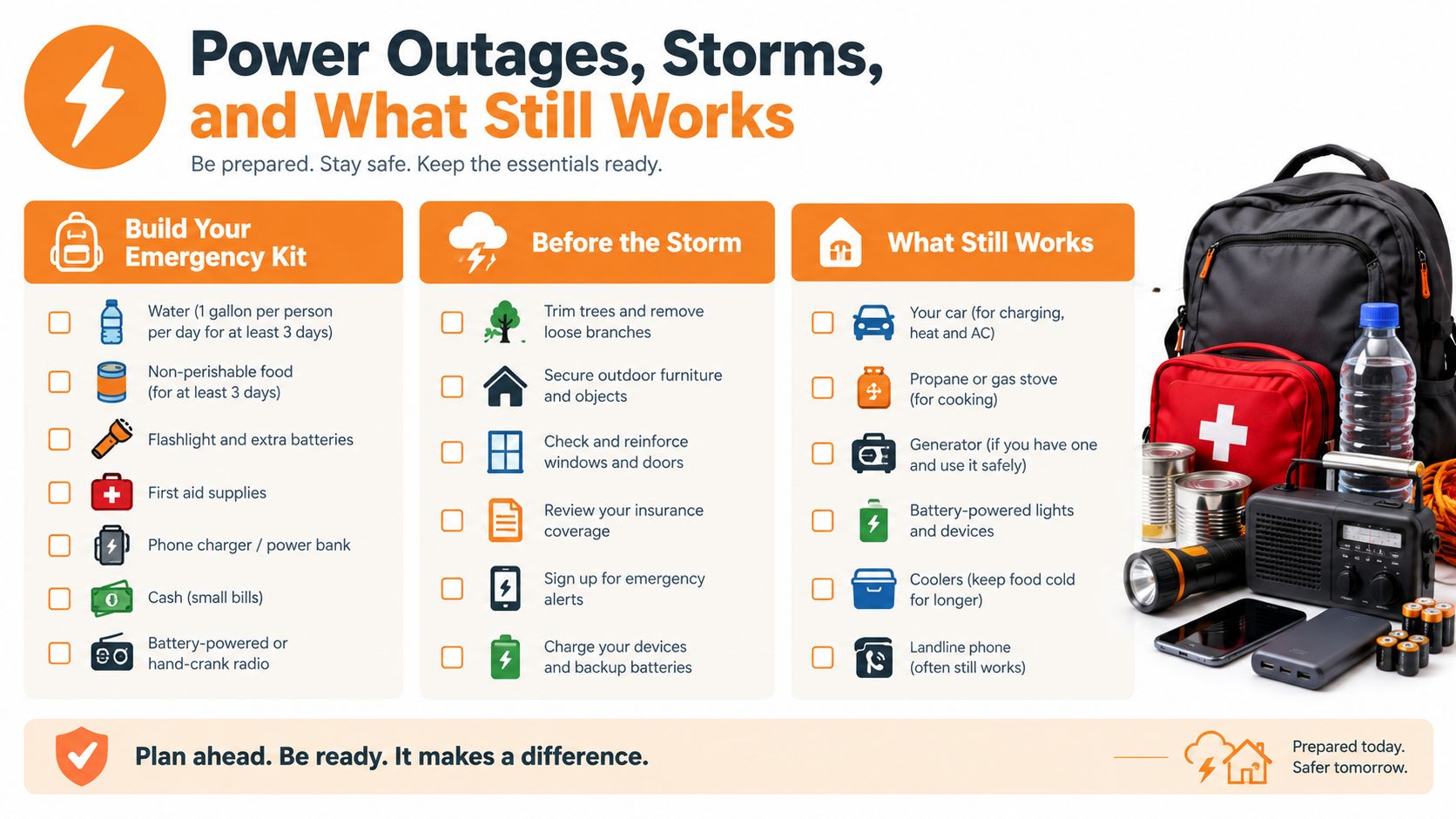
The lights go out, and the familiar home handset goes silent. Its appearance tells you little about whether it can work without household electricity. Before the next storm, find out what powers the service and arrange a backup the person can use without help.
The FCC's 911 reliability guidance explains that a traditional copper-powered landline can continue operating during a household outage because the telephone company supplies power over the line. Voice service delivered through fiber, cable, or internet equipment generally needs local backup power. A phone plugged into a wall jack may depend on a modem or network terminal that stops working when the electricity fails.
A charged cell phone can make calls without the home's electricity, provided cellular coverage and network infrastructure remain available. A wireless home-phone box also depends on power and its network connection.
Choose your outage setup around what equipment provides the service, what powers that equipment, and how the household will communicate if either power or service is interrupted.
Make a simple outage plan
Ask the provider whether the home phone uses copper, cable, fiber, internet equipment, or a wireless box. Have them identify every device that needs power. For any battery backup, ask how long it is designed to support service and how to check and maintain it. “Landline” alone is not a useful answer.
Keep a charged mobile phone and a compatible charger or battery pack somewhere accessible. Let the person practice connecting it themselves. If caregiver contact normally depends on a platform such as Rx360, agree on a voice-call fallback for times when that digital connection is unavailable.
The University of Michigan's emergency-preparedness report found that only about half of adults aged 50 to 80 reported having communication tools such as a battery, solar, or hand-crank phone charger or radio for an outage, while 22% experienced an emergency or disaster in the prior year, including a prolonged power outage.
Test the arrangement safely using the provider's instructions. Don't unplug equipment that should remain connected. During a simulated outage, check whether calls work and whether the person can reach and operate the backup. Keep its instructions where both the user and caregiver can find them.
Keep a usable backup, not just spare equipment. Agree on whom to call during an outage and keep the home address with those contact details.
Staying Connected to Caregivers and Platforms
A daughter texts that she will arrive later, but her parent is waiting beside the home phone. The message never reaches the device they answer. Choose the family's contact routine first, then choose phones that support it.
A familiar home handset works well for voice check-ins and calls with friends. Whether it connects through copper, VoIP, or a wireless home-phone box, a standard voice-only handset won't display texts, app notifications, or video links. Keep it if it gets answered. Add a mobile device when the person needs contact away from home or wants digital updates.
Make being reachable the goal, including during outages. For caregiver check-ins, agree on whether the person should confirm they are home or tell someone they are heading out. Don't assume that owning a mobile phone means the family knows where its user is.

Choose for the person, not the stereotype
As noted earlier, Life Assure on older adults' phone arrangements describes varied household setups. Those categories don't establish which device feels comfortable in someone's hand. A person who likes physical buttons may prefer a basic mobile for outings; an experienced smartphone user may want calls and messages together.
Practice the actual check-in.
For example, send a visit confirmation to a basic phone and ask the person to open it and reply. That tests a useful task without adding apps. On a smartphone, practice finding the same message, opening a video-call link, and recognizing a notification. Keep only the channels the person can use comfortably.
Before choosing connected-care tools such as Rx360, check which devices and communication methods the service supports. Don't assume a basic phone can receive an app-based update. Decide who reads platform messages and how important updates reach the older adult if they prefer voice calls.
A smartphone should support independence, not become a test of it. Keep familiar calling available, make digital tasks manageable, and choose a device that stays charged, is easy to find, and gets answered.
Cost, Billing, and What Caregivers Overlook
Put the current phone bill on the table before comparing offers. Ask what the household pays to keep the person reachable, support emergency location information, and maintain calling during outages. That is the setup you're budgeting for.
Separate the service charge from equipment rental, optional features, and calls outside the plan. For internet-based voice, or VoIP, ask how much the broadband bundle costs with and without phone service. For a wireless home phone, include required equipment and its service plan. For copper service, confirm what you're buying rather than relying on the "landline" label.
Check the person's recent calling habits before paying for extras. Frequent family calls, long waits for assistance, and mobile data use should guide the plan choice. A basic voice plan deserves consideration when calls are the main need. If caregiver communication through Rx360 requires a separate device or data plan, include that expense rather than assuming the home-phone bill covers it.
Get these answers in writing:
- Monthly charges: What is the recurring total, including required equipment, and how does changing the bundle affect it?
- Calling rules: Are long-distance calls included? Which call types cost extra?
- Outages: What backup equipment is included, and what must the household buy separately?
- Emergency calling: Who sets and updates the service address, and what location information accompanies a 911 call?
- Contract terms: When does promotional pricing end, and is there an early termination fee?
- Backup upkeep: Who checks the battery, replaces it, and pays for replacement?
Budget for backup equipment from the start.
Use the University of Michigan emergency-preparedness report cited earlier as a reminder to make outage preparation a budget item. Record any battery or charger purchase separately from recurring charges, along with maintenance or replacement requirements.
Compare each option's monthly total, upfront equipment costs, and backup responsibilities against the person's habits. Choose a predictable bill and a setup they can use independently. A low introductory price loses its appeal when required equipment and ongoing upkeep are left out.
Matching the Phone to Real Life Scenarios
There isn't one best setup for every older adult. The practical choice depends on how often someone leaves home, the controls they can comfortably use, and the kind of contact their family expects. Here are three household patterns to make the decision concrete.
The active older adult: They walk the dog, drive to nearby errands, and visit family. A cell-first arrangement makes sense because the phone travels with them. A home phone may still be worth keeping if the household relies on it or prefers a fixed handset. Why it works: the mobile phone supports calls away from home, while a home phone remains available for routine use.
The person who mostly stays home and prefers simple controls: They want a stable handset with large, easy-to-read buttons and don't care for text messages or apps. A familiar home phone can be the everyday option, paired with a basic cell phone for times they leave the house. Before relying on the home service during an outage, confirm whether it's copper or depends on local equipment and backup power. Why it works: the main phone fits the person's habits, while the mobile device adds portability.
The household with caregiver check-ins: The older adult is comfortable using a smartphone, and a family member wants to send messages as well as call. A smartphone can support those routines, with a familiar home phone kept if it's useful for everyday voice contact. If a connected service is part of the plan, choose one the user is willing to use and make sure the family agrees on what messages it supports. For broader planning around aging-in-place solutions, focus on keeping the person's routines and preferences central. Why it works: the setup supports different kinds of contact without assuming one device must do everything.
A Friendly Decision Checklist and 30-Day Test
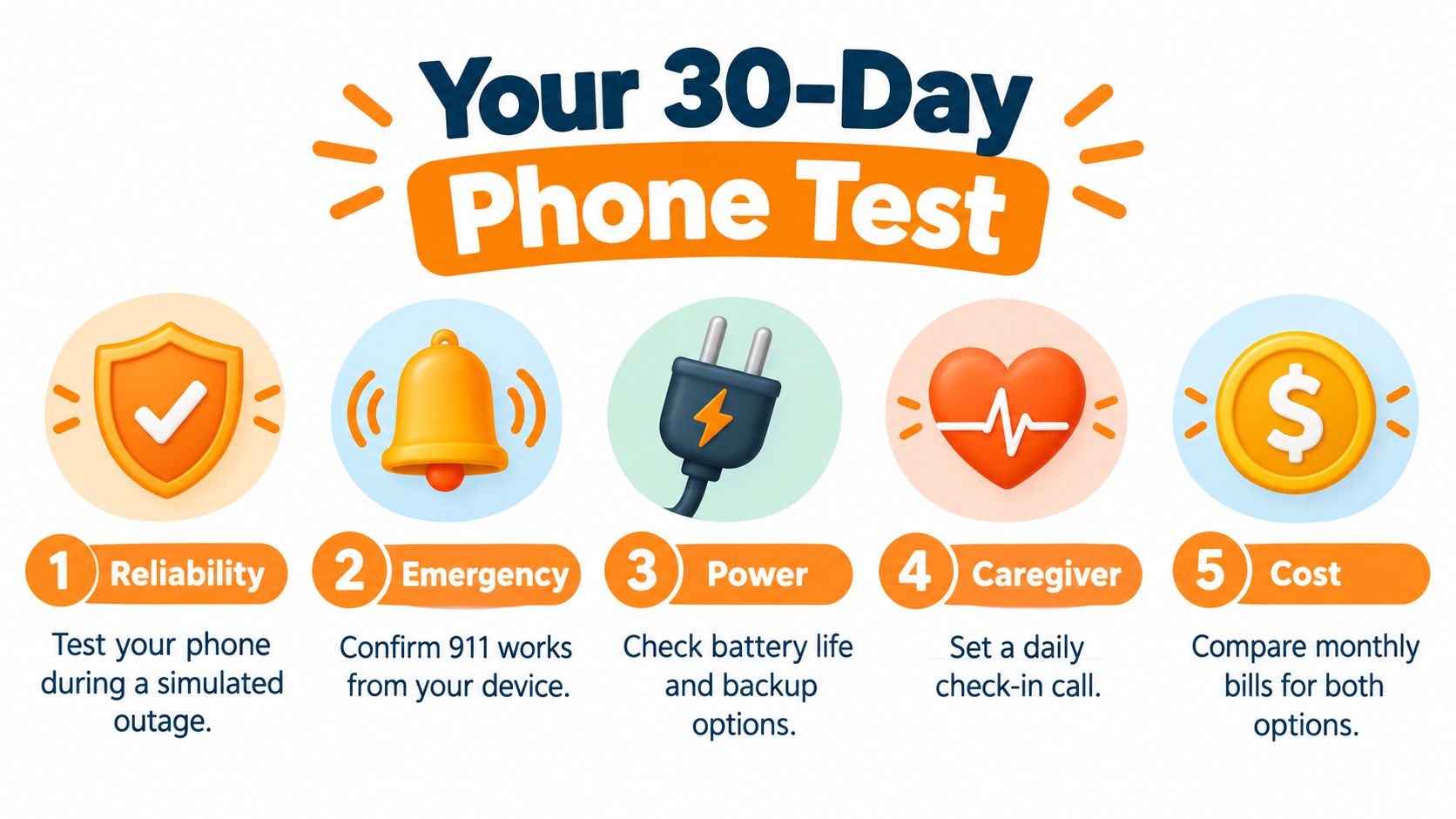
Before choosing, check that the person can use the phone comfortably, that the household understands its power and network needs, and that the caller can give their location clearly. Compare the monthly bill and decide how caregivers will check in.
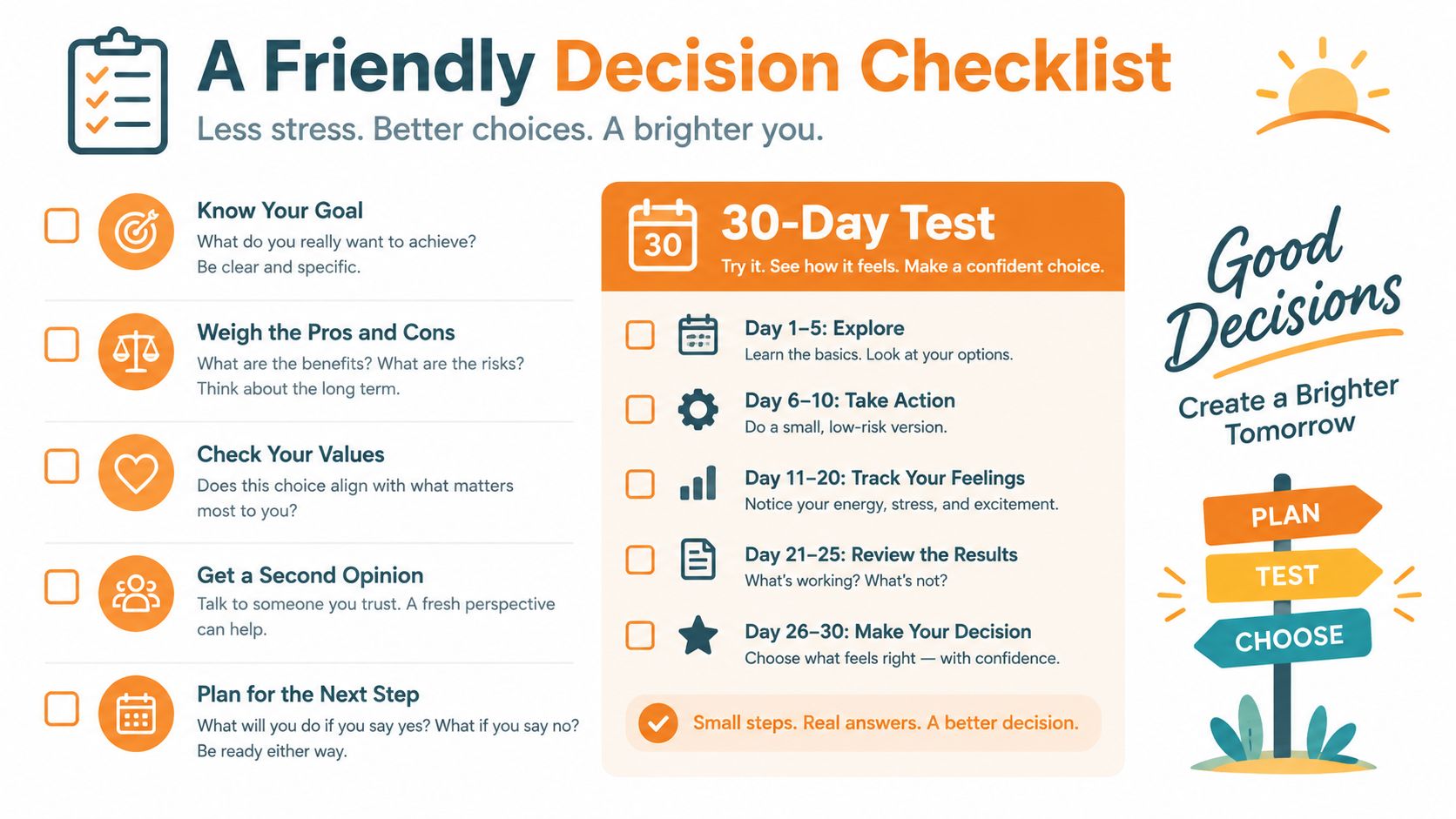
Over the next 30 days, try a provider-approved outage test, place a caregiver check-in call on each device, confirm the service address and emergency-calling details with the provider, and review the bill. Keep the combination that the person can use and the family can maintain.
Rx360 brings together health insights, smart technology, and connected care to help independent older adults stay connected with loved ones while maintaining autonomy. If you're building a phone and caregiver setup around everyday routines, visit Rx360 to explore how its platform can support aging in place.
Lower-Risk Medication Plan Checklist
Below is a practical checklist and step plan you can implement into your daily life:
-
List all medications
Include prescriptions, over-the-counter drugs, supplements, sleep aids, creams, patches, eye drops, and inhalers.
-
Mark fall-risk drugs
Flag medicines that cause dizziness, sleepiness, confusion, blurred vision, low blood pressure, or low blood sugar.
-
Ask for a medication review
Bring the list to a pharmacist or prescriber.
-
Review after any warning sign
Request a new medication check after a fall, near-fall, new prescription, dose change, dizziness, or confusion.