
You've probably had this moment recently. You're sitting in a clinic room, maybe helping a parent keep track of a visit, and the clinician turns a screen toward you. A medication list, a recent result, and notes from last time are already there, no folder hunting required.
It's a small moment, but it raises a fair question. Where did that information come from, who else can see it, and why does it sometimes show up in one place but not another? Understanding how electronic health records work gets easier when you picture one shared record seen through many windows, with different people seeing the parts they're allowed to see.
Table of Contents
- What an EHR Is and Why It Replaced the Paper Chart
- What Lives Inside an Electronic Health Record
- How Records Travel Between Systems With FHIR and HL7
- Keeping Your Record Private With Layered Safeguards
- What a Visit Looks Like Behind the Screen
- Portal Access and a Checklist for Your Record
What an EHR Is and Why It Replaced the Paper Chart
The information in this section comes from the PAHO health information systems page, which describes electronic health records and how they're used to store and share patient information.
Say you're at a routine visit and the clinician asks about a test from a few months ago. With a paper chart, someone might need to find a folder, check another office, or wait for pages to arrive. With an electronic system, an authorized person can pull up that information at the point of care in seconds.
One Record With Several Windows
An electronic health record, or EHR, is an electronic system designed to collect, store, manipulate, and provide secure access to full patient information. That's a mouthful, so try this picture instead. A paper chart is like a single folder in one filing cabinet. Only one person can hold it at a time, and it lives in one place.
An EHR works more like a shared notebook with several windows. Clinicians get one view, patients get another through a portal, and care teams get views shaped for their roles, but they're all looking at the same underlying record. The information doesn't need to be copied into separate folders for each person.

What That Record Can Hold
In practice, the record may contain:
- Demographics and diagnoses: basic identifying details and conditions a clinician has recorded
- Medications and allergies: current prescriptions and recorded reactions
- Laboratory results and imaging reports: test values and written summaries
- Clinical notes and treatment plans: what was discussed, observed, and planned
- Summaries of care: condensed versions meant to travel between visits or organizations
Because the information is stored electronically, the system can do things paper can't. It can support communication between providers, bring data together from different parts of an organization, connect to clinical knowledge bases, and integrate decision-support tools. For someone focused on positive daily routines, mobility, and aging in place, that connected picture can include information from primary care visits, hospitals, home health services, and observations a patient reports, when systems and permissions support appropriate exchange.
A simple model to keep: one record, many windows, controlled access.
There's one caveat worth knowing early, because it causes a lot of confusion. EHRs can exchange information between organizations, but being able to send data doesn't automatically mean the receiving system can interpret or use it without friction. Sending a file and understanding it are two different steps. That gap is why standards matter so much, and it's a big part of how electronic health records work in daily life.
What Lives Inside an Electronic Health Record
The component list in this section comes from the PAHO health information systems description of what an EHR may contain, paired here with plain language examples of how each part tends to appear.
Think of the table below as a map. If you're looking for something specific, scan the first column for the type of information, then check the example column to see how it usually shows up.
| Component | What It Holds | Everyday Example |
|---|---|---|
| Demographics | Name, date of birth, contact details | Confirmed at check-in |
| Diagnoses | Conditions the clinician has recorded | Shown on the problem list |
| Medications | Current and past prescriptions | Reviewed at each visit |
| Allergies | Recorded drug or substance reactions | Flagged so future prescribers see it |
| Laboratory results | Test values with reference ranges | Appear in the portal once released |
| Imaging reports | Written radiology reports | Usually the summary text, not the image |
| Clinical notes | What was discussed, observed and planned | Written after each visit |
| Care plans | Goals and follow-up tasks | A physical therapy follow-up schedule |
Where Entries Come From
Not every entry arrives the same way. A clinician might type a note during or after a visit. A laboratory system might send results automatically. Another organization might import a summary, or a patient might enter information themselves, such as a home reading or a log of daily activity, sleep, or balance exercises. The provider organization decides what gets accepted into the official record, so patient-entered information and clinician documentation don't always sit side by side in the same place.
That mix of origins leads to a helpful distinction. An original observation is the thing that was directly measured or reported, like a test value with a date and time. An interpretation is someone's reading of that information, and a summary is a shorter version built from other entries. Knowing which one you're looking at helps you ask better questions about where it came from.
Recent HL7 guidance on AI transparency proposes recording AI involvement, provenance, model information, prompts, and inference confidence within FHIR resources. In plain terms, the idea is that if software helped generate or summarize text, that fact should travel with the record instead of staying invisible. That's useful context when a summary reads smoothly but you're not sure who, or what, wrote it.
A shared record isn't always a complete record. Information held by another practice may simply not be there yet.
That last point clears up a common misunderstanding. A record can be accurate as far as it goes and still be missing pieces held elsewhere. If something you expected isn't visible, it doesn't necessarily mean it was deleted. It may live in a different system, under a different organization, waiting to be requested or imported.
How Records Travel Between Systems With FHIR and HL7
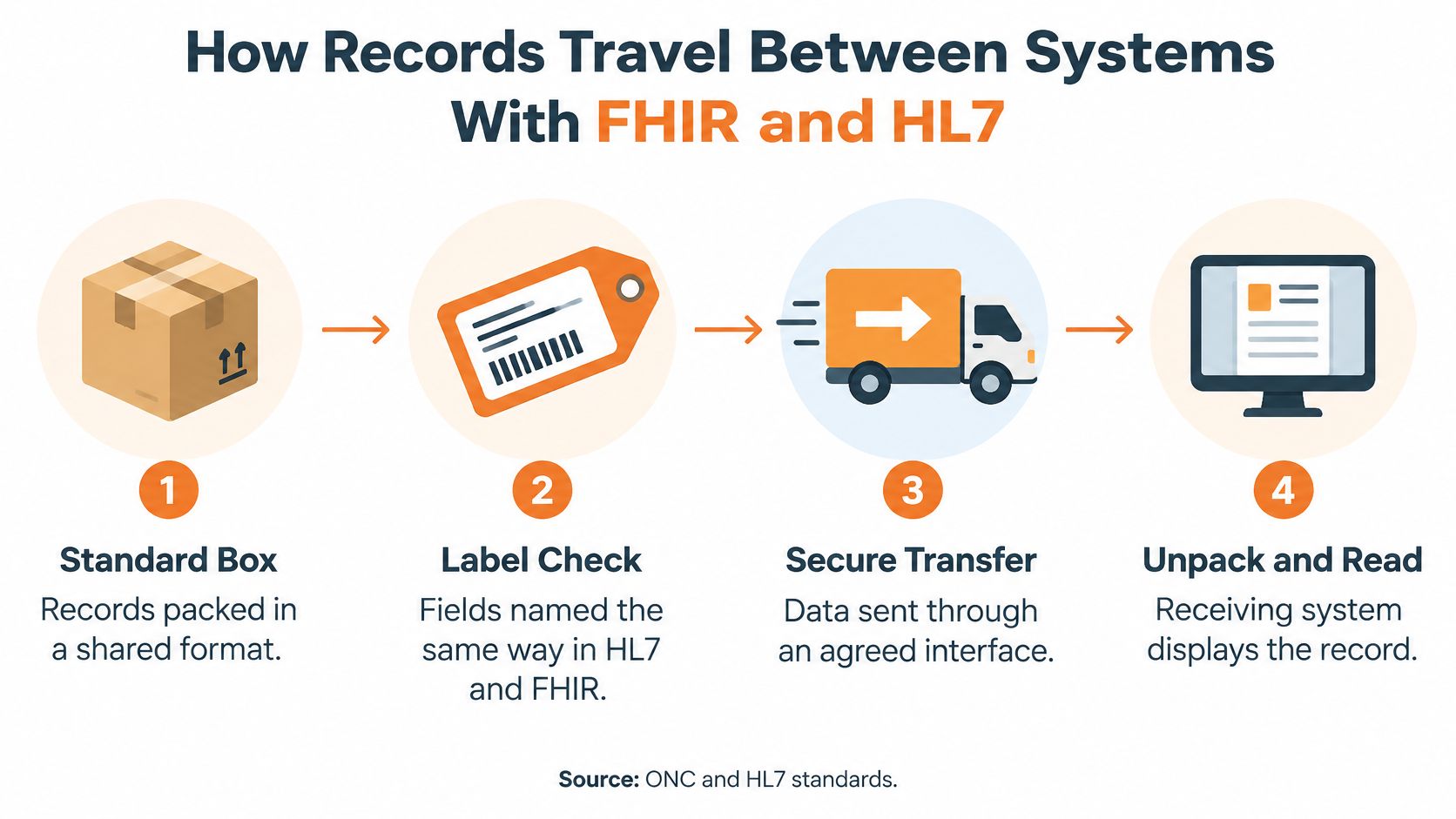
A clinic and a hospital may use different software, much like shipping companies use different systems to track parcels. For a health record to move between them, both sides need shared rules for labeling and exchanging information. The result is one record that can appear through different software windows, though access to its contents does not automatically mean every app can use them.
Resources as Standard Boxes
HL7 FHIR is an API-focused standard organized around modular components called Resources. Each Resource defines data elements, constraints, and relationships for one exchangeable part of a record, such as a medication or encounter. FHIR also sets standard HTTP operations for creating, reading, updating, and searching those Resources. Systems can therefore exchange information without storing it in identical internal formats.
FHIR has developed to cover many kinds of health information, including observations and care plans. The ONC Health IT material on FHIR describes 145 Resources. Each provides a shared structure for a particular type of information, like a standard box with a label both systems can interpret.
APIs as the Delivery Route
An API is a structured connection that lets an authorized application request specific information from another system, rather than requiring someone to retype it or send a one-off document. The CMS Interoperability and Patient Access fact sheet says the rule selected HL7 FHIR Release 4.0.1 as the foundational standard for certain exchanges and required affected health plans to implement a Patient Access API beginning January 1, 2021. Separately, ONC research on digital health companies reports that developers of certified APIs had to adopt FHIR by December 31, 2022. In a 2023 survey, 73% of surveyed digital health companies used standards-based APIs to integrate with EHRs.
A typical request follows these steps:
- The app asks for permission to connect.
- The server checks identity and scope, or who is asking and what they may request.
- The app requests a specific Resource, such as a medication list.
- The server returns structured data in the shared FHIR format.
- The app displays the data in a form a person can read.
This is how many connected health solutions can connect with existing records, by requesting defined pieces of information rather than an entire chart. A shared standard helps information travel, but each app still needs permission and the ability to make use of the data it receives. Interoperability is not one giant shared database. It is a way to move and interpret defined pieces of information across systems, parcel by parcel.
Keeping Your Record Private With Layered Safeguards
The information in this section comes from NIST guidance on access control described in HL7 material and from ONC's Interoperability Standards Platform on SMART App Launch and secure access.
It's tempting to think record privacy is just a username and password. In practice, EHR security is policy-enforced authorization, meaning systems allow access only to authorized people or software programs, with access rights explicitly specified. Several layers work together to make that happen.
| Safeguard | What It Checks | Everyday Example |
|---|---|---|
| Identity proofing | That the person signing up is who they claim to be | A verification step when a portal account is created |
| Authentication | That the person logging in is the account holder | A password plus a second step, such as a code |
| Role or attribute-based access | Whether a user's role allows a given view | A nurse sees different fields than a billing team |
| Authorization scopes | Which resources an app may request | Read-only access to medications, nothing else |
| Session controls | How long a login stays active | An automatic sign-out after inactivity |
| Encryption | Whether data is unreadable to anyone without the key | Scrambled data in storage and transit |
| Audit logging | Who accessed what, when, and with what outcome | A record reviewed when access looks unusual |
| Periodic privilege review | Whether old permissions still make sense | A yearly check that a former caregiver's access was removed |

How Apps Get Permission
When an app connects to a record, SMART App Launch is commonly used alongside FHIR APIs. The app requests authorization from an OAuth 2.0 compliant authorization server, and that server controls which information the app can then retrieve. Identity and permission checks happen first, data requests second. ONC also describes SMART Health Links, which can place a limited amount of information in a secure QR code and support limited-time, long-term, and password or PIN-protected access for larger or more dynamic records.
There's a real trade-off built into these choices. Overly broad permissions increase the number of accounts or apps that can view or change sensitive records. Narrow permissions reduce exposure, but they still need to allow emergency and cross-organizational access when care depends on it. Audit logs help balance that tension by recording who accessed what, when, and with what outcome, so unusual access can be investigated. If you want the compliance side in plain language, this overview of what HIPAA compliance involves covers the basics.
For families, one detail matters a lot. A caregiver's view should be separate from clinician privileges, scoped to what's needed, and consent and revocation should work in both directions. Granting access and taking it away are both normal parts of the system.
What a Visit Looks Like Behind the Screen
Margaret, a retired woman, arrives at her primary care office for a routine appointment. At check-in, staff confirm her contact details on screen. Because the information is already in her record, she only needs to correct anything that has changed. This example is illustrative, not a real patient.
Following Margaret Through the Visit
In the exam room, the clinician reviews Margaret's medication list and recent laboratory results, then adds the visit note to the same record. The EHR works like one shared file viewed through different windows: a clinician sees the information needed for care, while other users may see a narrower view. Tools such as clinical decision support tools can sit alongside this workflow, helping clinicians use information in the record as they make care decisions.
When the clinician makes a referral, the information goes electronically to a physical therapist. The therapist can see relevant parts of Margaret's record rather than starting with a blank page. Later that week, a home health nurse opens the updated list before a home visit. Same record, different window. Each handoff works best when the information is current, complete, and available to someone with the right permissions.
Margaret's daughter has a separate role. With Margaret's permission, she checks portal results from home. Her view is narrower than the clinician's, which lets her stay informed without taking over the care team's work.
How Common This Has Become
Electronic records are now common in office-based care. Adoption accelerated after federal incentive programs for certified health IT took effect. In 2008, fewer than 20% of office-based physicians had adopted an EHR with advanced capabilities. By 2024, 91% were using a certified EHR, according to the ONC data brief on office-based physician EHR adoption from 2008 to 2024.
Having a shared record does not guarantee that every detail is easy to use. Fewer lost files and faster retrieval can help patients and clinicians, but a visit also involves more screen work. Information may be incomplete if it was never entered or did not arrive from another system. That is why a clinician may still ask you to confirm something already listed in your record.
Portal Access and a Checklist for Your Record
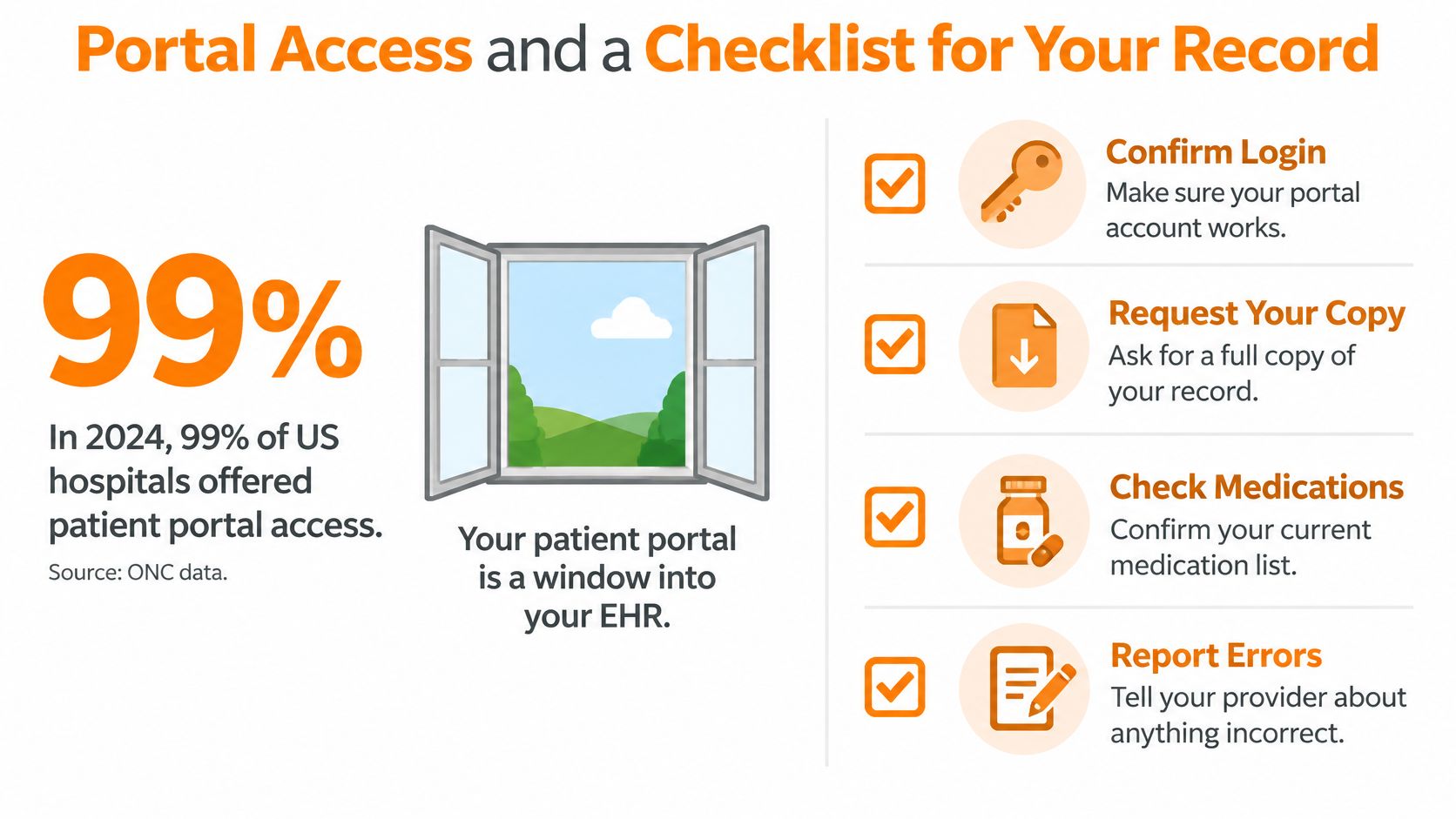
A portal is one window into an electronic health record, not the whole record itself. Hospitals may let patients view, download, or send information through that window, but having access does not always make the information easy to find or use.
In 2024, 99% of U.S. hospitals enabled patients to electronically view health information such as test results. 96% enabled downloading and 84% enabled transmitting information to a third party, according to ONC data on hospital patient engagement capabilities. These figures describe what hospitals made available, not how easily each patient could use it.
Having Access Isn't the Same as Using It Easily
A 2025 patient portal usability study published in JMIR reported an average System Usability Scale score of 63.3 and identified room for improvement, particularly for older users and people from culturally and linguistically diverse communities. A portal can offer many functions and still leave someone unsure where to find a result, how to understand it, or what to do next.
| Measure | Figure | Context |
|---|---|---|
| Average System Usability Scale score, 2025 patient-portal study | 63.3 | Study noted room for improvement, particularly for older and culturally and linguistically diverse users |
Everyday obstacles can include a difficult sign-up process, language barriers, confusing design, concerns about trust, or limited help using digital tools at home. Access is most useful when a person can find the right information and understand what it means. A simple interface matters, but so does having a person available to answer questions.
Access on paper and access you can actually use on a Tuesday evening are two different things.
Rx360 is a wellness platform designed to help independent older adults stay connected with loved ones and healthcare providers while maintaining autonomy. Its Health Insights, Smart Technology, and Connected Care bring wellness signals, daily activities, and timely updates into an experience intended to support familiar routines. It does not replace the clinical record, and a portal remains the window for viewing information held by healthcare organizations.
A Practical Checklist for Your Own Record
- Find out which organizations hold your records. Different practices may keep separate records, so a simple list can help you know where to look.
- Create your portal account and note the identity check. Knowing what sign-up required can help if you need to recover access.
- List who can see what, in writing. Confirming caregiver access and each person's role helps keep permissions clear.
- Ask how records from different practices are brought together. Find out whether information arrives automatically or only when requested.
- Confirm you can view, download, and transmit your information. These are separate capabilities, and a portal may not offer all three.
- Ask whether summaries are original notes or generated text. Find out whether any AI involvement is labeled so you know how to read a summary.
- Keep a personal copy of key information. A copy you control can be useful when systems do not connect smoothly.
- Revisit permissions once a year. Roles and relationships can change, so access lists may need updating.
Access rules differ by organization. Confirm the details with your provider's office. Health questions belong with your clinician, while account, permission, and record-copy questions belong with the organization holding the information. Knowing which contact can help makes it easier to use the right window into your record.
If staying independent at home while keeping family in the loop sounds like the balance you're after, Rx360 offers Health Insights, Smart Technology, and Connected Care for daily wellness signals, family updates, and provider involvement. The platform is designed to support routines and connection without adding complexity or replacing independence.
Lower-Risk Medication Plan Checklist
Below is a practical checklist and step plan you can implement into your daily life:
-
List all medications
Include prescriptions, over-the-counter drugs, supplements, sleep aids, creams, patches, eye drops, and inhalers.
-
Mark fall-risk drugs
Flag medicines that cause dizziness, sleepiness, confusion, blurred vision, low blood pressure, or low blood sugar.
-
Ask for a medication review
Bring the list to a pharmacist or prescriber.
-
Review after any warning sign
Request a new medication check after a fall, near-fall, new prescription, dose change, dizziness, or confusion.