You're probably juggling fragments of care right now. A medication list sits in one app, blood pressure readings live on paper near the kitchen table, and a doctor's recommendation is buried in a portal message no one else in the family can see. Meanwhile, the older adult at the center of it all may want help, but not so much help that daily life starts to feel supervised.
That tension is where clinical decision support tools become useful. In hospitals, these tools already help clinicians catch medication issues, follow guidelines, and make safer decisions. In 2017, about 40.2% of U.S. hospitals had advanced clinical decision support capability, showing their significant integration into mainstream care, and that momentum is now extending beyond hospitals into community and home settings.
For families, caregivers, and clinicians supporting aging in place, the big question isn't whether decision support matters. It's how to make it work in everyday life, inside ordinary homes, ordinary routines, and ordinary conversations, without taking control away from the person receiving care.
Table of Contents
- The Challenge of Modern Caregiving
- What Are Clinical Decision Support Tools
- Understanding the Core Components of CDS
- Common Types of Clinical Decision Support Tools
- CDS in Action for Independent Aging
- How Rx360 Reimagines CDS for Home and Family
- Best Practices for Effective CDS Implementation
The Challenge of Modern Caregiving
Elena checks her phone before breakfast. Her father slept poorly, missed an afternoon pill yesterday, and mentioned feeling dizzy during a call with his daughter in another state. His primary care doctor wants updates. His cardiologist changed one medication last month. His neighbor helps sometimes, but only when she's available. No one person has the full picture.
That's modern caregiving for many families. Care rarely happens in one place anymore. It happens across homes, clinics, pharmacies, video visits, text threads, notebooks, and memory. The older adult may be managing several conditions at once while also trying to protect something just as important as safety, which is independence.
Where people get stuck
The hardest part usually isn't lack of caring. It's coordination.
A family caregiver may ask questions like these:
- Did she take the new dose or the old one
- Is that symptom new, or has it been building for days
- Who already knows about the change
- Does this need urgent attention, or just a note for the next visit
When those answers are scattered, small issues can turn into stressful ones. A missed dose may look like forgetfulness when it is confusion. Fatigue may seem minor until a pattern appears across several days. A physician may make a careful decision during an appointment, but that decision is harder to carry out if the home routine doesn't support it.
Practical rule: The more people involved in care, the more valuable it becomes to turn scattered observations into shared, timely guidance.
Why hospital tools matter at home
Hospitals adopted decision support because clinicians needed help making safe choices in busy environments. That need hasn't disappeared outside the clinic. It has just changed shape.
At home, the challenge isn't usually interpreting a wall of lab results. It's knowing what today's information means and what to do next. A family member may need a prompt to follow up after a missed medication. An older adult may need a simple nudge that fits naturally into the day. A clinician may need a concise update instead of a long verbal summary.
That's why clinical decision support tools matter beyond hospital walls. They can help turn raw information into useful action. They don't remove judgment. They support it. For older adults aging in place, that support can mean fewer avoidable surprises, less confusion for families, and a calmer path through everyday care.
What Are Clinical Decision Support Tools
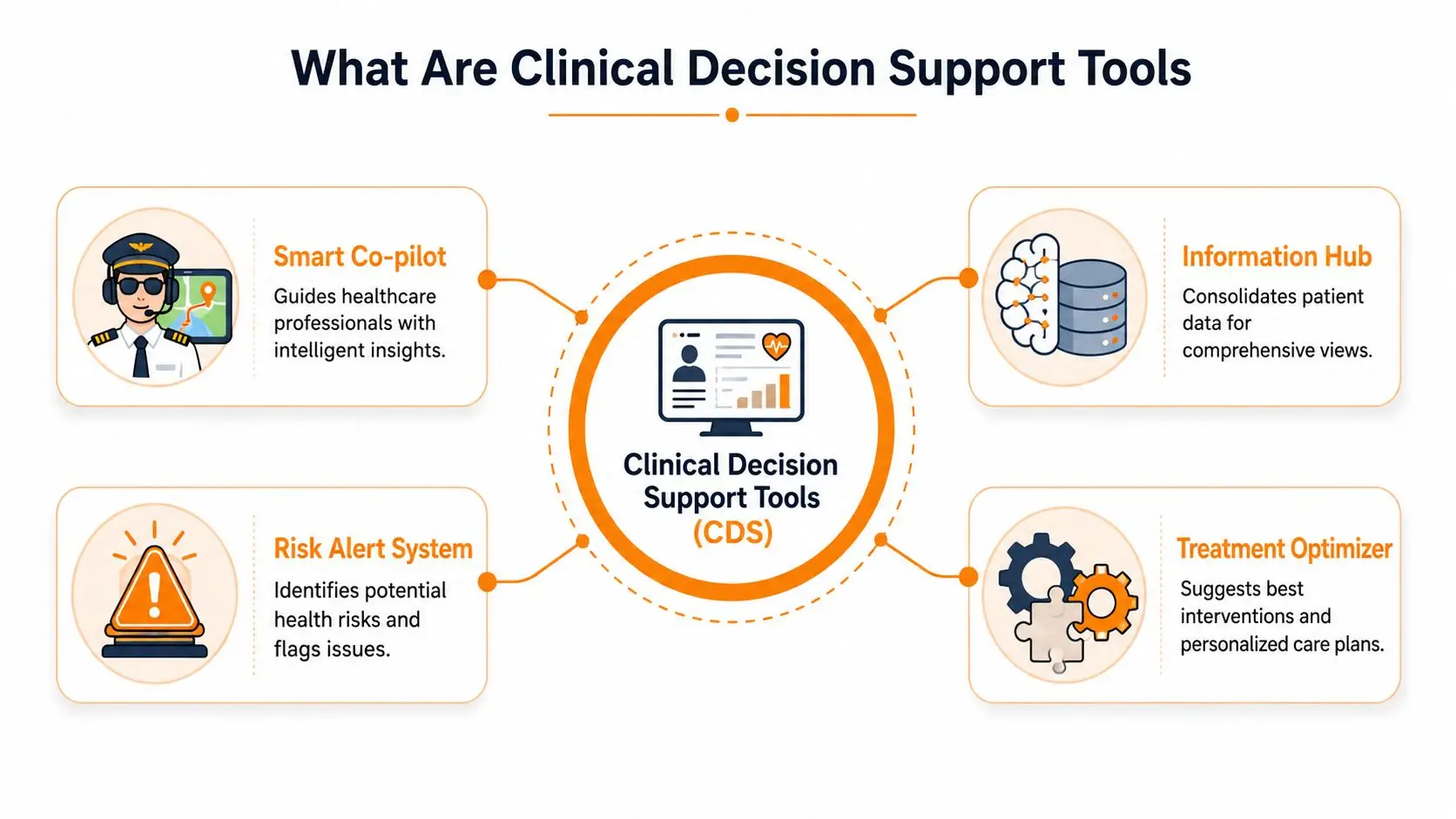
The simplest way to understand clinical decision support tools is to think of them as a smart co-pilot for healthcare. A co-pilot doesn't take over the journey. It watches the route, notices hazards, and speaks up when something needs attention. In healthcare, that might mean flagging a possible drug interaction, reminding a clinician about a guideline, or helping a caregiver notice a pattern worth sharing.
Clinical decision support tools work best when they deliver the right information to the right person in a format they can use, at the moment a decision needs to happen. Sometimes that “person” is a physician choosing a treatment. Sometimes it's a pharmacist checking medication safety. In home-based care, it may be an older adult deciding whether to rest, hydrate, or call someone.
What these tools actually do
A lot of readers hear the phrase and assume CDS must be highly technical or limited to hospitals. It doesn't have to be.
In plain language, these tools often do things like:
- Alert for safety issues such as a risky medication combination
- Prompt the next step such as a recommended screening or follow-up
- Organize data into patterns so trends become easier to spot
- Support choices with evidence so decisions aren't based on memory alone
A useful mental model is GPS. Your GPS doesn't drive the car. It combines current location, known routes, and live conditions, then offers guidance while you remain in control. Clinical decision support tools do something similar with health information.
What they are not
They aren't replacements for clinicians, caregivers, or the older adult's own preferences. That misunderstanding causes a lot of resistance.
When CDS is well designed, it supports human decision-making instead of crowding it out. That distinction matters because healthcare decisions often involve tradeoffs, values, and context. A system may identify a risk, but people still decide what matters most, what's realistic at home, and what action fits the situation.
Good clinical decision support feels less like a command and more like a well-timed tap on the shoulder.
That's part of why these tools matter so much. When implemented well, clinical decision support systems can reduce diagnostic errors by up to 30%, showing their value for safer care and better decisions. The benefit comes from timely, evidence-based guidance that helps people act before a problem grows.
For families supporting aging in place, the lesson is simple. A good tool doesn't add noise. It makes the next right step easier to see.
Understanding the Core Components of CDS
Most clinical decision support tools are built on three core components: a data repository, an inference engine, and a communication system.
If that sounds technical, start with the basic question each part answers. What do we know? What might it mean? Who needs to hear about it, and how quickly? In home-based aging support, those questions matter because useful guidance depends on both medical facts and everyday observations.
The data repository
The data repository is the system's memory. It holds the information a CDS tool needs to work with, such as health history, medication lists, symptoms, care plans, and relevant clinical guidance.
In a hospital, much of this information comes from the electronic health record. For an older adult living at home, the picture is usually more spread out. It may include caregiver notes, symptom check-ins, blood pressure readings, sleep patterns, missed doses, or a daughter's note that her father seems more confused this week than last week.
That last detail matters. Aging in place often depends on small changes noticed in daily life before they show up in a formal visit. If the repository only captures medical chart data and misses what families and home care teams observe, the system has an incomplete picture.
The inference engine
The inference engine is the part that interprets what is happening. It reviews available information and compares it with clinical rules, evidence, or predictive models to identify possible risks, suggest next steps, or flag changes that deserve attention.
Some CDS tools use simple rule logic. If a medication conflicts with an allergy, show a warning. If a blood pressure reading is far outside a safe range, prompt follow-up. Those checks are still useful because they catch clear safety issues quickly.
Newer systems can also examine less structured information, including narrative notes and free-text observations, as described in Glass Health's overview of clinical decision support. That matters in aging-in-place settings, where the first sign of trouble may sound like, "She is eating less and seems slower getting out of bed," rather than a neat coded data field.
The communication system
The communication system delivers the guidance to the right person in a form they can use. A recommendation has little value if it arrives too late, goes to the wrong person, or shows up in language that feels confusing.
In a clinic, that may be an alert inside the EHR. At home, it may be a prompt for a family caregiver, a summary for a nurse, or a message that helps an older adult decide whether today calls for rest, monitoring, or a call to a clinician.
Good communication design also respects autonomy. An older adult who wants to stay independent does not need a stream of alarming notifications. They need guidance that is clear, proportionate, and tied to an action they can realistically take.
Why these components matter more at home
CDS in the home has a harder job than CDS in a tightly controlled clinical setting. Information arrives from different people, at different times, in different formats. The system has to make sense of formal health data and everyday context without overwhelming the people using it.
A simple way to understand the difference is to compare a clinic visit with a week at home. In a clinic, a blood pressure number may drive the decision. At home, that same number may mean something different if it appears alongside poor sleep, missed meals, dizziness, and a caregiver note about an unsteady walk.
That is why stronger CDS for aging in place combines three things:
- Structured data, such as medication lists, diagnoses, and vital signs
- Narrative context, such as caregiver observations, symptom descriptions, and changes in routine
- Clear delivery, so the insight reaches the older adult, family member, or clinician who can act on it
Platforms built for independent aging, including Rx360, are adapting these core components for real life outside hospital walls. The goal is not to replace judgment. It is to help families and clinicians spot meaningful changes sooner while still protecting the older adult's preferences, dignity, and control.
Common Types of Clinical Decision Support Tools
Not all clinical decision support tools do the same job. Some are built to prevent safety mistakes. Others standardize care, surface patterns, or help with diagnosis. Seeing the categories side by side makes the range of options easier to comprehend.
The tools most people encounter first
The most familiar CDS type is the alert. A clinician prescribes a medication, and the system flags an interaction or allergy concern. It's immediate, focused, and often safety-critical.
Another common category is the reminder. This might prompt a preventive screening, a follow-up task, or a routine step in chronic disease care. Reminders are usually quieter than alerts, but they can be just as valuable because they keep important tasks from slipping through the cracks.
Then there are order sets and care pathways. These bundle recommended actions for specific situations so clinicians don't have to rebuild a plan each time. For an older adult after a fall, for example, a standardized pathway may help guide assessment, medication review, and follow-up.
Comparison of CDS Tool Types
| CDS Type | Primary Function | Example for Aging-in-Place |
|---|---|---|
| Alerts and warnings | Flag immediate safety concerns | A warning that a new prescription may conflict with an existing medication |
| Reminders | Prompt routine or preventive action | A reminder to monitor symptoms after a medication change |
| Order sets and care pathways | Standardize recommended steps | A structured post-fall follow-up plan shared with the care team |
| Data summaries and trend reports | Turn scattered data into patterns | A weekly view showing sleep, missed doses, and symptom notes together |
| Diagnostic support tools | Help interpret complex clinical information | A tool that helps clinicians weigh possible causes of confusion or dizziness |
| Reference support within workflow | Deliver helpful guidance at the point of care | A clinician sees patient-specific guidance while reviewing the chart |
Why different tools fit different problems
One reason CDS can feel overwhelming is that people expect one tool to do everything. That rarely works well.
A few practical distinctions help:
- Alerts are best for urgent risks. If a medication could cause harm, the system should interrupt.
- Reports and summaries are better for patterns. If fatigue is slowly increasing, a weekly trend may be more useful than a loud alert.
- Diagnostic support helps when the situation is ambiguous and several explanations are possible.
- Care pathways help teams stay aligned when many steps need coordination.
A strong CDS setup doesn't shout constantly. It speaks differently depending on the kind of decision someone needs to make.
For older adults living at home, this matters a lot. A missed blood pressure reading may not require an urgent warning. A dangerous medication conflict probably does. Good design matches the message to the situation, so the support feels helpful instead of exhausting.
CDS in Action for Independent Aging
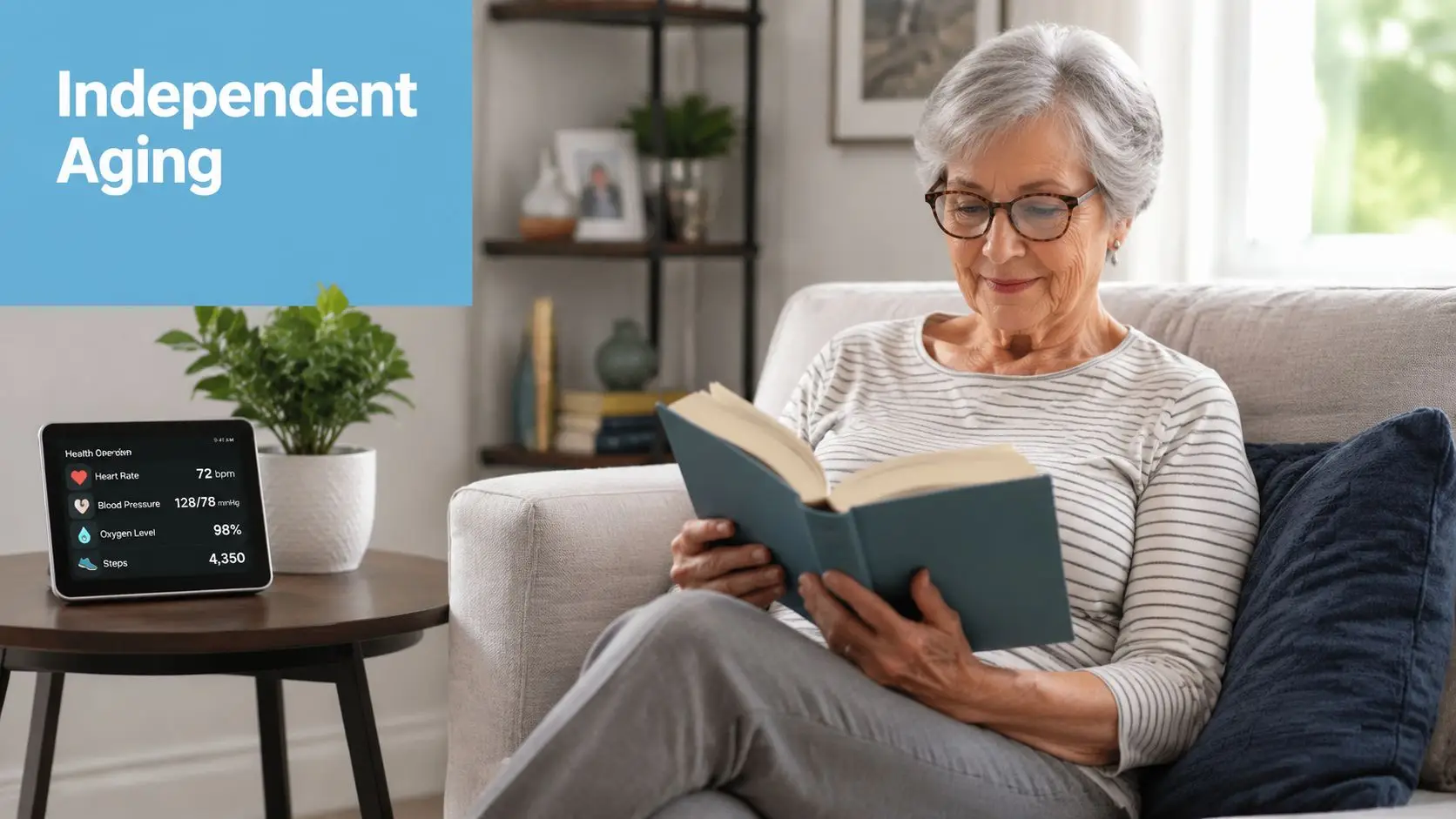
Independent aging doesn't look like a hospital floor. It looks like breakfast at the kitchen table, a walk to the mailbox, a blood pressure check before lunch, and a phone call with family in the evening. If clinical decision support tools are going to help here, they have to fit into that rhythm.
A day shaped by small signals
Consider an older adult managing blood pressure medicine, arthritis pain, and occasional dizziness. Nothing dramatic happens. That's often the point. Good support helps small concerns stay small.
A home-based system might notice that medication confirmations have become inconsistent over several days. It may pair that with notes about fatigue and a change in daily activity. Instead of producing a confusing clinical summary, it can prompt a simple next step. Check in. Review the pill routine. Share an update with the clinician if the pattern continues.
That's CDS at home. It takes observations that might otherwise stay isolated and turns them into timely guidance.
Where home support becomes practical
The home versions of these tools can show up in several forms:
- Medication support through dispensers or reminders that make routines clearer
- Monitoring support through wearables or connected devices that surface meaningful changes
- Telehealth support that helps clinicians review home information with more context
- Family coordination support that routes the right update to the right person
The goal isn't to flood everyone with data. It's to reduce uncertainty.
Here's a short explainer that helps make the concept more concrete:
Safety and independence can work together
Some older adults hesitate when they hear about monitoring or decision support. That hesitation makes sense. No one wants to feel watched, managed, or reduced to alerts.
The better approach is subtle support. A useful tool respects routine, communicates clearly, and leaves room for choice. It helps people stay independent by lowering the chance that an unnoticed problem will disrupt daily life.
For family caregivers, that often means less second-guessing. For clinicians, it means getting clearer information from the home. For the older adult, it can mean living more freely because the support is present without being intrusive.
How Rx360 Reimagines CDS for Home and Family
A daughter notices her father skipped his usual morning check-in. His pillbox says one thing, his calendar says another, and the last clinic note is buried in a portal she rarely opens. Nothing looks urgent on its own. Together, those small clues can signal the start of a problem.
That is the gap Rx360 is trying to close. Many clinical decision support tools were built for hospitals, where trained staff work inside shared systems and formal workflows. Life at home runs differently. Decisions happen in kitchens, over text messages, during quick calls between work meetings, and in the quiet moments when an older adult decides whether something feels normal enough to ignore.
A home-centered CDS model treats those everyday moments as part of care, not as noise around it.
The need for a home-centric CDS layer
Families often end up using separate tools for medication reminders, activity tracking, appointment notes, and check-ins. Each tool may do its own job well, but the full picture stays fragmented. That is like driving with a GPS that shows only one street at a time. You have pieces of direction, but not enough context to choose the best turn.
A home-centric CDS layer brings those pieces together and translates them into guidance people can use. Instead of asking an older adult or family caregiver to interpret raw data, it highlights patterns that matter in daily life, such as a missed routine, a change in mobility, or a series of small issues that may deserve a closer look.
What makes this approach different
Rx360 adapts CDS to the realities of aging in place. The goal is not to turn the home into a hospital. The goal is to help older adults stay safe without giving up privacy, routine, or control.
That changes the design priorities. A useful home platform should do more than collect information. It should help the right person notice the right thing at the right time, in language that feels clear and calm.
For example, it can:
- Bring together home signals such as check-ins, device data, and routine changes
- Highlight meaningful updates so family members can tell the difference between normal variation and a possible concern
- Support autonomy with respectful prompts and simple explanations
- Give clinicians better context about what happens between visits, without requiring everyone to work inside a hospital EHR
Rx360's connected aging-in-place platform reflects that model. It places decision support closer to everyday life, where many care decisions happen.
The practical shift is easy to miss, but important. Traditional CDS often assumes a clinician is the main user. Home-centered CDS recognizes a care circle instead. The older adult, an adult child, a home aide, and a primary care clinician may all need different views of the same situation. Good design respects those differences rather than forcing everyone into a single clinical workflow.
Technology for aging in place works best when it feels like support in the background, not control from above.
That is why tone matters as much as logic. If a system sounds cold, overly technical, or constantly alarmed, people stop trusting it. If it behaves more like a reliable guide, similar to a GPS that offers helpful rerouting without taking the wheel, people are more likely to keep using it.
For older adults, that can mean more confidence living at home. For family caregivers, it can mean fewer hours spent guessing. For clinicians, it can mean clearer signals from the home instead of scattered anecdotes.
Best Practices for Effective CDS Implementation
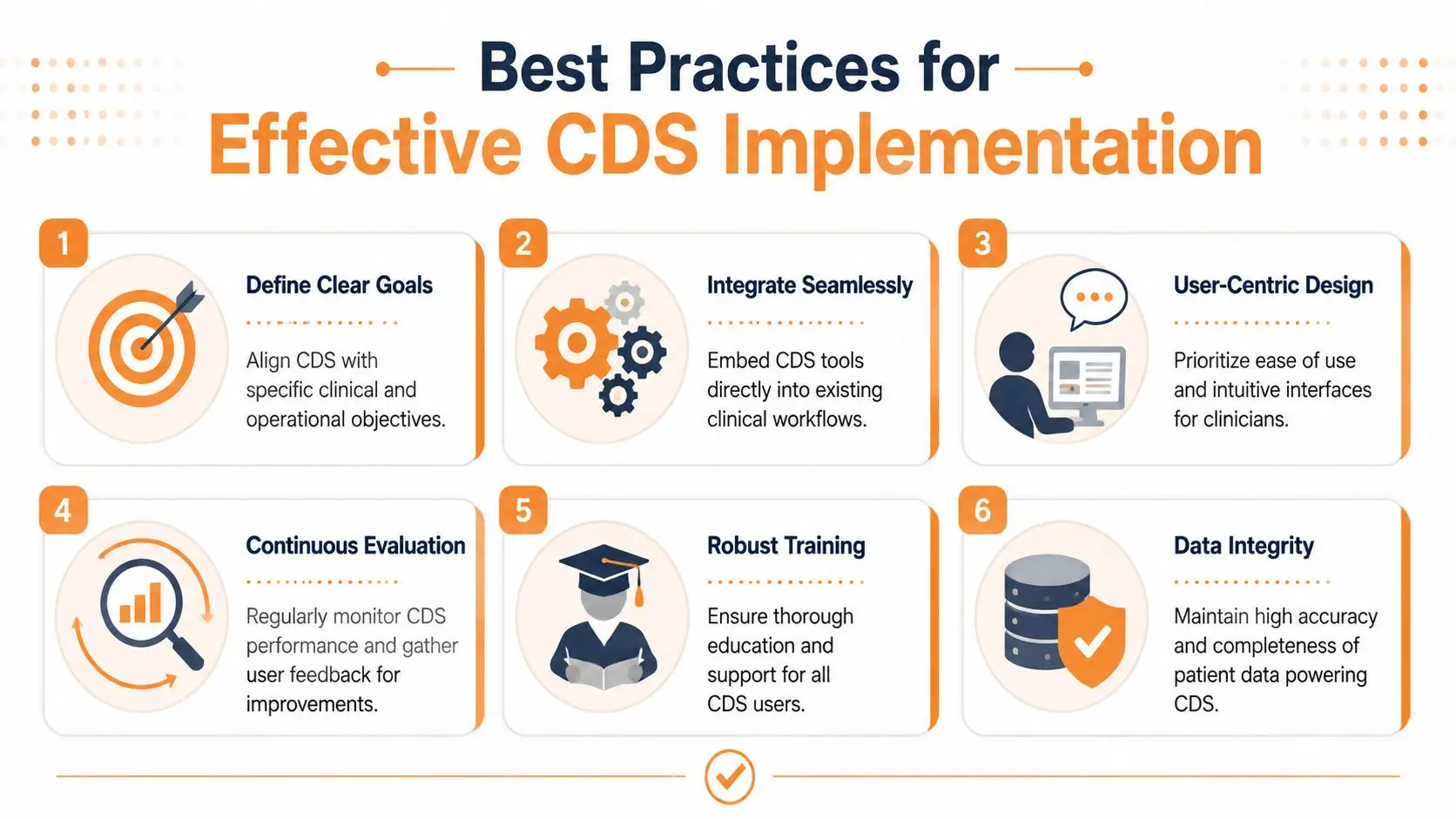
A clinical decision support tool succeeds when it fits real life. People need to trust the guidance, understand why it appeared, and know what to do next without feeling buried in another piece of software.
That matters even more at home. In a hospital, a CDS alert usually reaches a trained clinician inside a formal workflow. In aging in place, the same kind of guidance may reach an older adult, an adult child, a home aide, or a nurse. Good implementation starts with that difference. The tool has to support safety while still leaving room for choice, routine, and dignity.
What to look for before adopting a tool
A useful CDS system works like a GPS for healthcare. It points out a possible wrong turn, explains the concern clearly, and helps the person decide what to do next. It should not constantly shout directions or try to take the wheel.
If you are evaluating CDS for clinical care, family caregiving, or home support, ask practical questions first:
- Does it fit into daily routines Guidance should appear where decisions already happen, whether that is in a clinic visit, a caregiver update, or a home monitoring dashboard.
- Does it explain the guidance clearly People are more likely to act on an alert when they understand what triggered it and why it matters.
- Does it support different users well A clinician may need trend data, while a family member may need plain-language next steps and an older adult may need a simple, respectful prompt.
- Does it limit noise Too many alerts train people to ignore the system, including the moments that deserve attention.
Human-centered implementation matters most
Strong technology alone is not enough. The rollout has to match human behavior.
A better plan usually includes clear goals, simple onboarding, and shared rules for who responds to what. If the goal is medication safety, define what counts as a missed dose, who gets notified, and when a clinician should be contacted. If the goal is helping someone stay independent at home, decide which patterns deserve action and which ones should be watched over time.
Privacy belongs in that plan too. Home-based CDS only works when people feel safe sharing information about daily routines, medications, and health changes. Reviewing a platform's privacy policy for home-based health support should be part of the evaluation, especially when multiple family members and care professionals will use the same system.
The right CDS tool should lower mental effort, not create another dashboard people feel responsible for checking.
A practical checklist
Before choosing any platform, look for these signs of a good fit:
- It connects the right information without requiring constant manual updates.
- It turns data into a clear next step instead of just displaying numbers.
- It matches the setting whether that setting is a clinic, a family care network, or one person living independently at home.
- It respects autonomy so support feels helpful rather than controlling.
- It makes roles clear so everyone knows who is informed, who responds first, and when to escalate.
That last point often decides whether a tool gets used consistently. In home care, confusion spreads quickly. A daughter assumes the aide will follow up. The aide assumes the nurse already saw the alert. The older adult does not want to bother anyone. Good CDS reduces that uncertainty by making responsibility visible.
Platforms such as Rx360 show why this approach matters for aging in place. The goal is not to copy hospital CDS into the home. The goal is to adapt decision support so it helps older adults stay safer at home while giving families and clinicians clearer, calmer signals they can use.
Lower-Risk Medication Plan Checklist
Below is a practical checklist and step plan you can implement into your daily life:
-
List all medications
Include prescriptions, over-the-counter drugs, supplements, sleep aids, creams, patches, eye drops, and inhalers.
-
Mark fall-risk drugs
Flag medicines that cause dizziness, sleepiness, confusion, blurred vision, low blood pressure, or low blood sugar.
-
Ask for a medication review
Bring the list to a pharmacist or prescriber.
-
Review after any warning sign
Request a new medication check after a fall, near-fall, new prescription, dose change, dizziness, or confusion.