After a clinic visit, an older adult may want to return to familiar routines, while a family member living elsewhere hopes to understand what was recorded. An electronic health record (EHR) can help a healthcare provider organize information over time. It does not automatically give the patient or family access to that information, or make it available across different care settings.
The Centers for Medicare & Medicaid Services (CMS) describes an EHR as a medical history maintained by a provider over time. An EHR is more than a single visit note or a scanned paper chart. It is part of the provider's recordkeeping for ongoing care.
Paper records from different appointments may sit in separate folders and need to be gathered. Electronic systems change how providers store and access information, but electronic doesn't always mean portable or personally controlled. A provider's EHR is distinct from an electronic medical record (EMR), a certified system, and a patient portal. Each has a different role, and information may not move easily between organizations.
This distinction can prevent a common misunderstanding: having a record in a provider's system does not necessarily mean a patient can open it or share it with a relative. Portal access and sharing permissions are separate from the record itself. The provider's system determines what appears and how access is arranged.
Older adults and family members may also need different kinds of updates. Connected care for families describes the broader context of staying connected while supporting independence, including everyday wellness information that can sit alongside formal medical records. Understanding EHRs starts with knowing what a provider's record can hold, then considering how access and sharing work.
Table of Contents
- Why Electronic Health Records Matter at Home
- What an Electronic Health Record Actually Holds
- How Electronic Health Records Differ from EMRs
- Why Your Record Does Not Always Follow You
- What Older Adults Can Open and Share
- How Clinicians Use Records in Everyday Care
- Questions to Ask and a Practical Next Step
Why Electronic Health Records Matter at Home
After a visit, an older adult may remember the conversation differently from a family member hoping to help keep track of care. An electronic health record (EHR) is part of the healthcare organization's recordkeeping. It can help authorized providers find information maintained across a person's care history, including when several providers are involved. It does not automatically give the patient or family access to that record.
That distinction matters at home. Hearing that information is “in the system” may sound as if every provider can see it, or a relative can log in. In reality, provider systems, patient portals, and sharing permissions can operate separately. A digital record available to one care team may not be easy for another clinic to find.
A record is not the same as a portal
A healthcare provider maintains the EHR. A patient portal is an access point the provider may offer, allowing a patient to view some information from the record. Which items appear, whether they can be shared, and whether an authorized representative can see them depend on the provider's system and access arrangements.
Consider an older adult who keeps a regular routine at home while a family member lives far away and wants an update after a visit. The provider's record may support care, but viewing it can require a portal account, identity verification, and specific permissions. Even then, the portal may display only selected information.
Connected care for families explores how families can stay connected while supporting an older adult's independence. That connection may depend on agreed access, rather than on the record itself giving relatives control.
A useful distinction: The provider's record is where information is maintained. A portal is one way a person may be able to view some of it.
What digital records can and can't promise
A provider-held record can help organize information over time. It does not guarantee that every detail is complete, that every organization can exchange information, or that a patient can see everything the system contains. Those are separate matters, shaped by how the record and its access tools are set up.
Everyday wellness context, such as information from Rx360, can sit alongside the provider's record without becoming the same thing as that record. The EHR remains part of a clinic's infrastructure. Portal access and authorized sharing may give a patient or trusted person ways to view or share some information, but they do not automatically transfer control of the record.
A paper-versus-computer comparison alone misses these distinctions. It helps to ask who maintains the record, who can access it, and whether information can be shared between care settings. A digital file may support care while still not following someone everywhere or giving them direct control.
What an Electronic Health Record Actually Holds
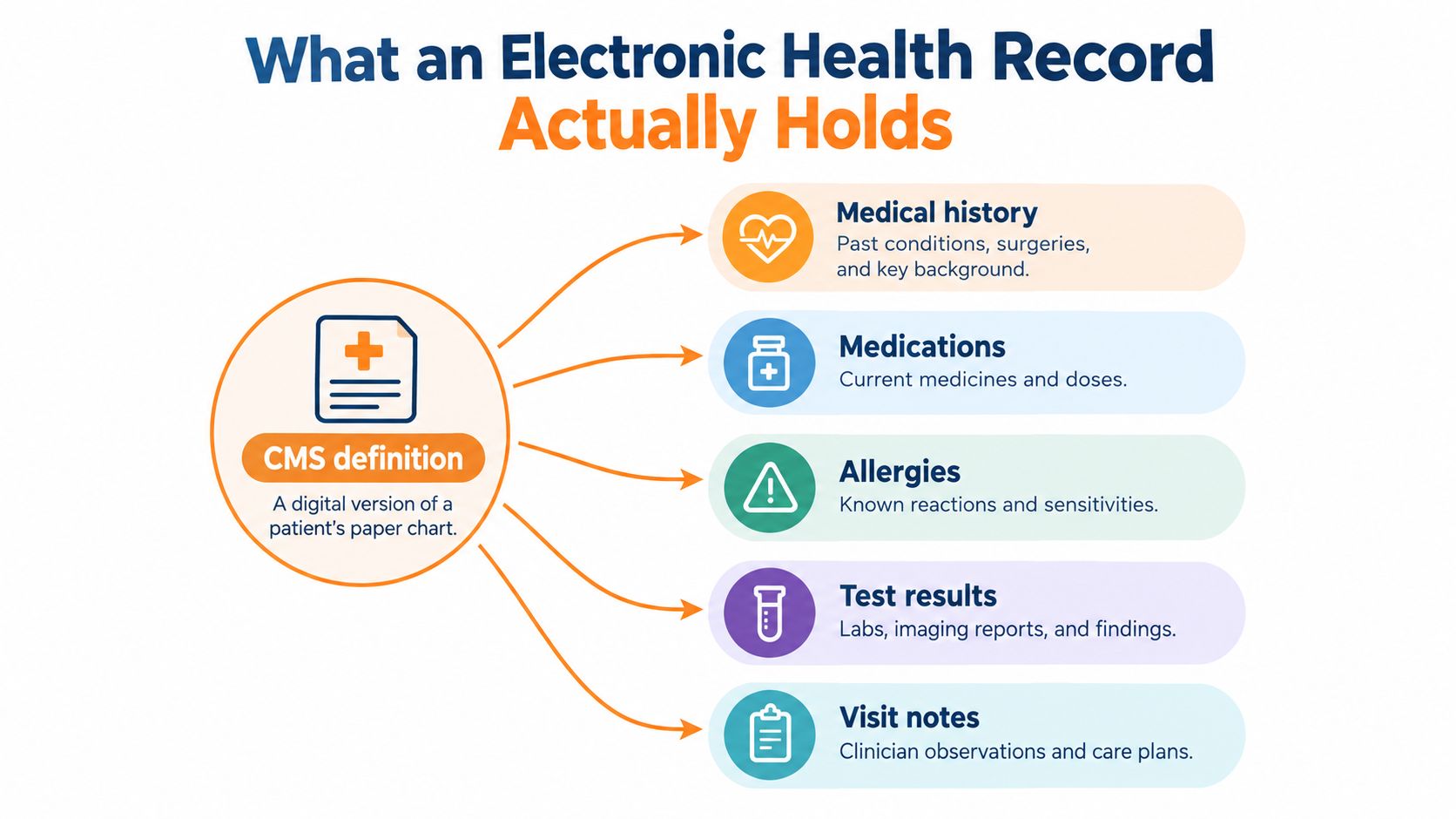
A visit note, medication entry, and test result can sit in different parts of a provider's electronic system. Together, these categories make up the kind of information an Electronic Health Record (EHR) may hold. The Centers for Medicare & Medicaid Services describes an EHR as an electronic version of a patient's medical history that a healthcare provider maintains over time. Its categories may include demographics, progress notes, health problems, medications, vital signs, past medical history, immunizations, laboratory data, and radiology reports.
A paper chart is like a folder assembled for an appointment, with separate sheets gathered together. An EHR works more like an organized filing system that a provider maintains over time. Authorized users may be able to retrieve relevant information without collecting paper files first.
Three defining mechanics
An EHR involves electronic storage, continued maintenance, and structured access. These describe how a provider-held record is organized and used. They do not mean every system contains every type of information.
Common categories include:
- Demographics and history: Background details and past medical history.
- Progress notes and health problems: Documentation entered as part of a person's care.
- Medications and vital signs: Information the provider maintains in the record.
- Immunizations, laboratory data, and radiology reports: Other information that may be included.
A provider's system determines which categories appear. One record may omit some types of information, and seeing an item in the system does not by itself show whether it is current or complete.
A scan isn't the whole idea
A scanned page can be stored electronically, but it remains an image of a document. In a structured record, an item such as a medication entry or test result is arranged as a distinct element the system can recognize.
That difference clarifies what an EHR describes: a provider-maintained electronic record with organized information that authorized users may retrieve. The term alone does not guarantee that the record is complete, that a patient controls it, or that information can be exchanged between providers. Clinic infrastructure and patient access are related, but they are not the same thing. Portal access, authorized sharing, and personal wellness information such as Rx360 sit alongside the provider's record, rather than automatically becoming part of it.
How Electronic Health Records Differ from EMRs
A family caregiver may see one clinician use a digital chart while another uses a separate system. Both records are electronic, but they may serve different roles. An EMR, or electronic medical record, is commonly a digital chart used within a practice. An EHR is designed to support clinical care and documentation across a broader health history, including information sharing beyond one practice. The terms are sometimes used loosely, so the distinction describes intended use, not a guarantee that records will move between providers.
The Office of the National Coordinator for Health Information Technology (ONC) reports that EHR use grew after the 2009 Health Information Technology for Economic and Clinical Health (HITECH) Act. At that time, fewer than 10% of hospitals and 17% of physicians used EHRs. By 2016, certified EHR adoption had reached 96% of hospitals and 78% of physicians. ONC's account of progress in digitizing health care describes this change in record keeping.
Paper, practice records, and EHRs
| Record type | Where it mainly lives | Primary purpose | Sharing expectation |
|---|---|---|---|
| Paper chart | In paper files held by a provider | Document and store information | Sharing may involve locating and moving documents |
| Practice-level EMR | An electronic system used within a practice | Maintain that practice's chart | Often focused on use within the practice |
| Any EHR | An electronic system maintained by a provider | Organize information for care and documentation | Exchange may be possible, but capabilities vary |
| Certified EHR | A system meeting defined technical and functional requirements | Support health-information management and exchange | Exchange is part of the system's requirements, but may still vary in practice |
Certification adds another distinction. A basic or non-certified electronic system can store a practice's chart. A certified EHR meets defined technical and functional requirements for health-information management and exchange. In other words, electronic describes the format, while certified indicates that a system meets specific requirements. Certification does not guarantee that every exchange between organizations will work smoothly.
For an older adult receiving care from several providers, an EHR can serve as shared infrastructure, rather than a personal file that automatically follows its owner. The portal may let a person view some information, and authorized sharing may help providers access records. Those features depend on the systems and arrangements in place. The record itself does not mean the patient controls every entry or every exchange.
ONC's hospital adoption data track basic and certified EHR use. A separate ONC overview reports that basic and certified EHR adoption among hospitals reached approximately 99% by 2018. It also reports that approximately 4,400 hospitals, or 87% of U.S. hospitals, had received at least one incentive payment by December 2013. The ONC hospital adoption data document the scale of the transition. Rapid adoption doesn't mean every system exchanges data in the same way.
For care at home, the practical value is that provider systems can support continuity when several clinicians are involved. Everyday wellness context, such as information tracked through Rx360, sits alongside that infrastructure, but it does not automatically become part of a provider's EHR.
Why Your Record Does Not Always Follow You
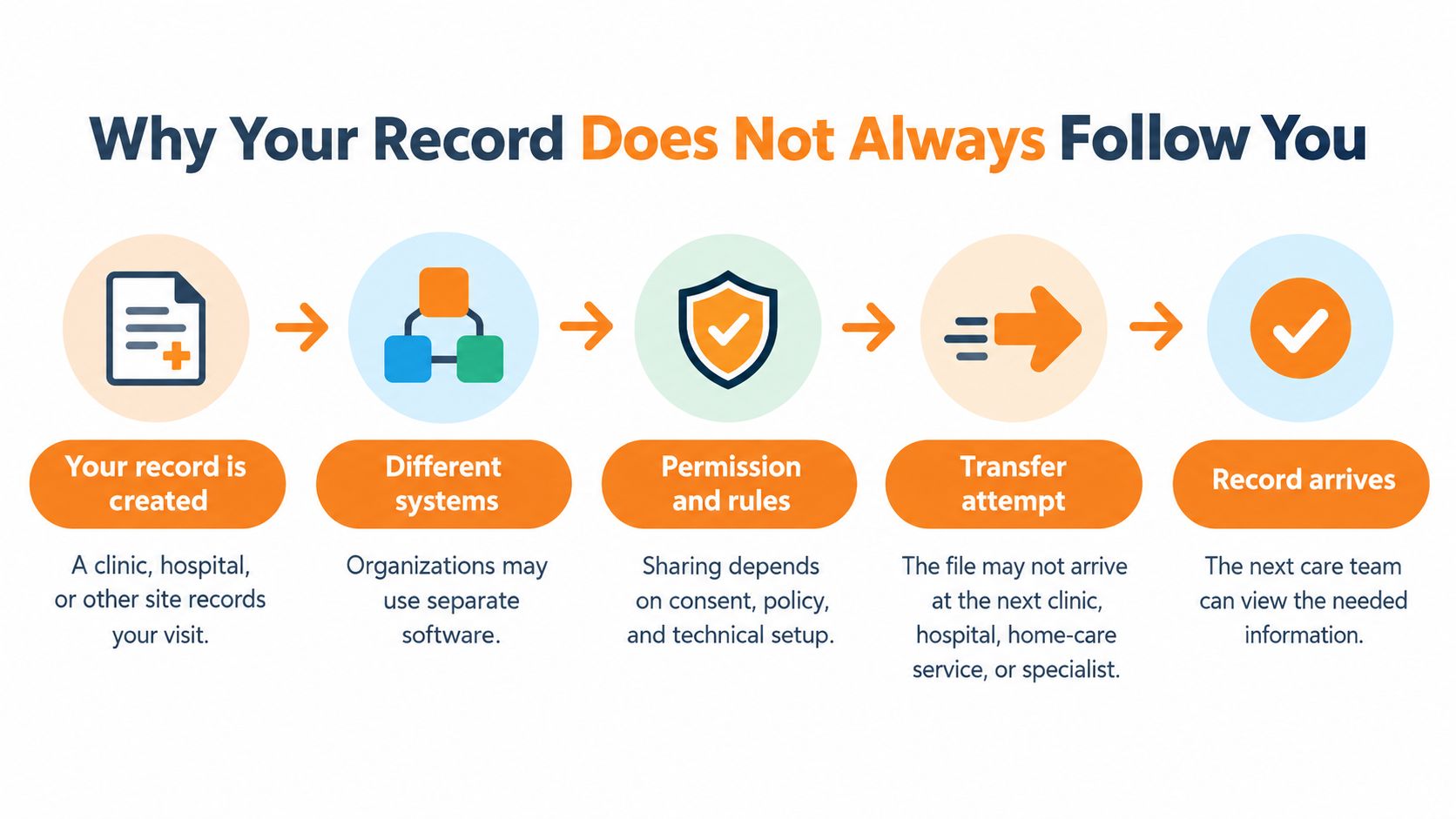
A clinic may have your electronic record, yet another clinic may not be able to use it in the same way. The World Health Organization (WHO) distinguishes structural interoperability, whether a receiving system can process information in a usable format, from semantic interoperability, whether it interprets that information with the same meaning. WHO's explanation of digital health information standards explains why sending a file is only one part of the process.
For example, a medication entry, lab result, allergy, or clinical note needs enough structure and context for another system to interpret it. Exchange can depend on shared standards and terminology, participation by both organizations, permissions, and the quality of the data. A file that opens may still be difficult to understand or use.
The information may exist but be hard to use
The rural-geriatric research in a Frontiers article on health and usability identifies poor integration between systems and limited information sharing across institutions as barriers to continuity for older adults and caregivers. Those barriers concern how records move between organizations. A separate usability issue arises when information is present but hard for staff to find or work with. The cited research supports the point about rural care, but it does not verify the claimed usability scores, so those figures are omitted.
Standards efforts address different parts of the exchange process. FHIR APIs provide a standards-based way for software to exchange health information. LOINC, RxNorm, and SNOMED are examples of terminologies that help systems use consistent labels and meanings. The ONC overview of interoperability standards and exchange describes USCDI as a standardized set of health-data classes and elements used in the federal health IT certification program. It also describes TEFCA as a nationwide governance, policy, and technical floor for organizations that securely exchange electronic health information.
Portability takes more than an electronic file
Before another care setting can use a record, the information may need to pass technical checks, match shared definitions, and meet organizational and permission requirements. Even after it arrives, staff may have trouble locating or interpreting it. “Electronic” and “portable” aren't synonyms.
For an older adult and family caregiver, this distinction matters because an EHR is clinic infrastructure, not automatic patient control of information. A provider's record may not appear at the next clinic, hospital, home-care service, or emergency setting. Portal access and authorized sharing offer ways to view or send some information, while everyday wellness context, such as Rx360, sits alongside rather than inside the provider-held record. The systems and the people and organizations using them shape what can be shared and understood.
What Older Adults Can Open and Share
A study of 250,345 adults aged 50 and older with chronic conditions found that 61% activated a patient portal and 54% logged at least one session. Engagement was 42% among adults aged 65 and older, and usage was also lower among Black patients and non-English speakers, including Spanish-, Somali-, and Hmong-speaking groups. A separate 2025 study found that 54.2% of older respondents demonstrated adequate eHealth-resource ability; poorer health, limited mobility, and socioeconomic deprivation were associated with lower digital health literacy. Research on patient portal engagement among older adults shows why having an electronic record and being able to use it are different things.
Those findings don't mean lower use is a personal failing. A portal can be difficult to use, inaccessible in a person's preferred language, or hard to work with on a particular device. And some people may have help from a trusted person, while others may want to manage their information privately.
Four related but different things
- Provider-held EHR: The electronic medical history maintained by a provider.
- Patient portal: A provider's access point for viewing some information, such as a medication list or a note from a visit. What appears depends on the system.
- Personal health record: A separate record or tool a person may use to gather or manage health information. It isn't automatically the same as the provider's EHR.
- Authorized representative access: Access granted to a trusted person under a provider's process. It can involve identity checks, consent, and privacy boundaries.
HIPAA compliance and privacy information can help readers understand why permissions and identity checks matter when information is shared. The arrangements differ across providers and systems, so a portal account doesn't automatically give a family member access.
Access can involve extra work
Portal access can shift coordination work onto families rather than automatically making care easier to manage. A representative may need to understand the account process, keep track of what's visible, and respect the patient's privacy boundaries. Some older adults may prefer to review information themselves; others may want to authorize help. Neither choice should be assumed from age alone.
If a person opens a portal, the information available might include a medication list or a visit note, but the provider's system determines what is shown. Being able to log in, understanding what appears, and choosing to share it are separate parts of access. A useful place to start is the provider's explanation of portal settings and representative permissions, without assuming that every portal works alike.
How Clinicians Use Records in Everyday Care
A systematic review of 12 studies found generally positive associations between interoperability and patient safety, including improved medication safety, fewer patient-safety events, fewer data-entry errors, and better data quality and scope. The review also notes that differences in outcome measures and study quality limit precise estimates of effect size. The systematic review of EHR interoperability and patient safety describes a relationship, not a guarantee that every exchange improves care.
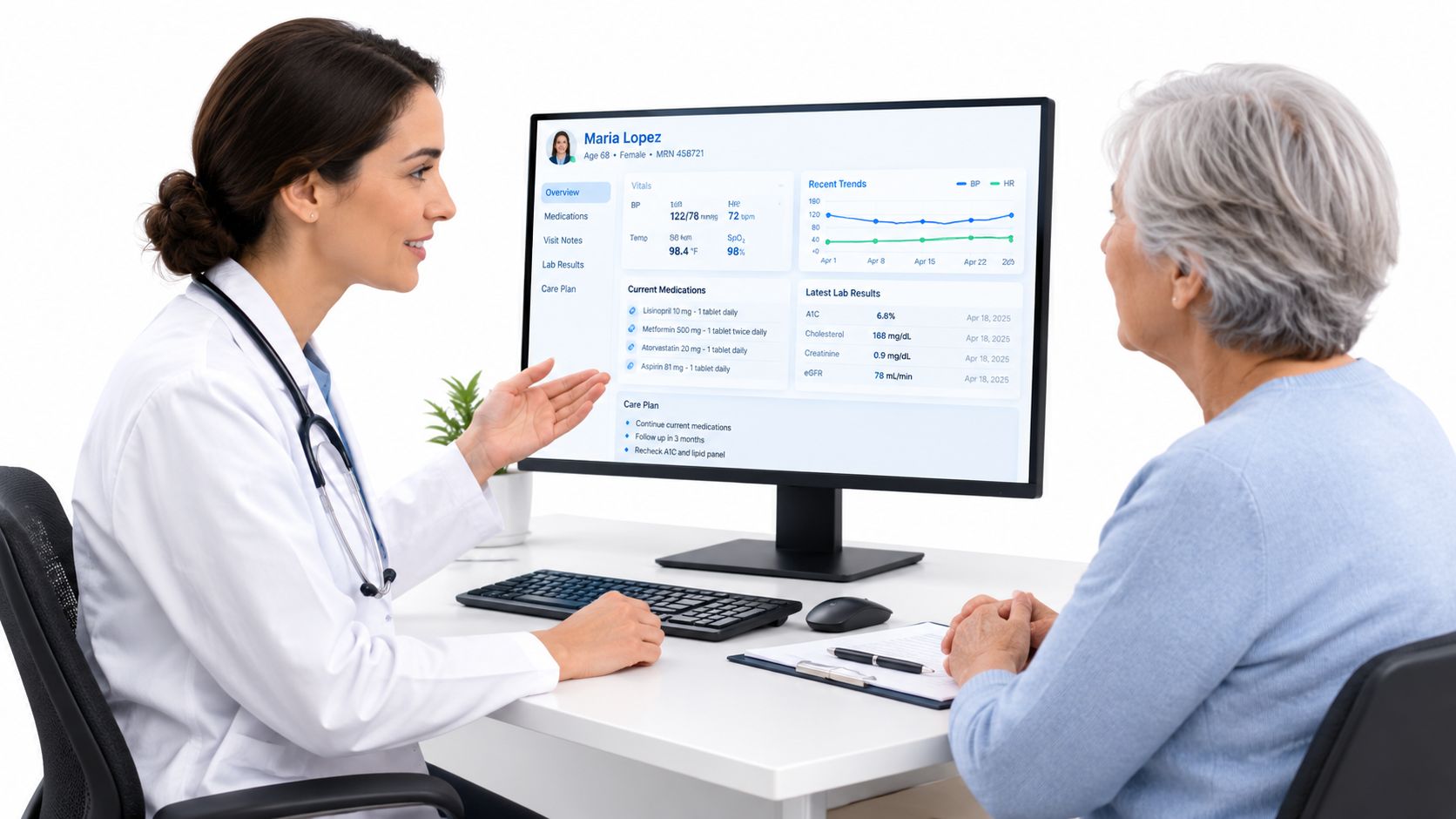
In everyday use, a provider-facing EHR can support computerized documentation, review of medication lists and allergy information, viewing test results, access to prior encounters, and information exchange. These functions help organize information that clinicians may use during care. They don't mean every provider sees every record or that each entry is current.
Information quality still matters
A record can be incomplete, stale, matched to the wrong person, or organized in a way that a different system interprets differently. A medication list might be missing an item. A result might not show a clear measurement time. Two systems might label the same idea in different ways. These are examples of why data quality matters alongside the ability to exchange information.
Organizations can use controls such as identity matching, timestamps and provenance, medication and allergy reconciliation, validation of units and coded values, role-based access, audit trails, and processes for missing or conflicting information. Those controls address information handling and permissions. They're not a guarantee that every record is complete or every exchange succeeds.
A review of clinical decision support tools can provide context about software features used within clinical settings, but an EHR's everyday role is broader: it maintains and organizes information. Clinical decision support tools are distinct from the basic job of keeping a longitudinal record.
For someone aging in place, a clearer shared history can mean less repeated paperwork during conversations with providers. That leaves more room to talk about everyday routines, mobility, sleep, and independence without treating an electronic record as a substitute for those conversations. The record supports documentation and information access; it doesn't decide what care should be provided.
Questions to Ask and a Practical Next Step
ONC's 2021 hospital data brief reports that, in 2019, the Centers for Medicare & Medicaid Services required hospitals to provide patients access to health information through an API using an app of the patient's choice. As of that reporting, seven in ten hospitals enabled access through mobile or other software applications, more than half enabled access through FHIR-based APIs, and more than four in five enabled patients to view clinical notes in a portal. ONC's 2021 hospital data brief on patient electronic access reports system capabilities. Those figures don't prove that every patient used the tools or that every record contained every type of information.
Questions for a provider or portal support team
A person can ask straightforward questions to understand the options:
- Notes: Are visit notes visible in this portal?
- Representative access: Can a personal representative be authorized, and what identity or consent steps apply?
- Portal or app: Which portal or app is available, and does it work with an app the patient chooses?
- Available information: What kinds of information are included, and can a person see a medication list or visit note?
- Privacy settings: Who can view the information, and how can access be changed or withdrawn?
The answers depend on the provider's system and policies. A portal may show some categories but not others, and representative access may have its own process.

Keep the roles clear
An EHR remains the provider-maintained clinical history. Rx360 is a wellness platform for independent older adults that brings together Health Insights, Smart Technology, and Connected Care. It helps people and loved ones stay aware of daily routines and wellness signals, while keeping healthcare providers part of a coordinated conversation.
Rx360 doesn't replace the medical record, diagnose, or direct care. Its role sits alongside clinical records, supporting connection around everyday wellness rather than changing what the provider's EHR is. A practical next step is to check the current portal or representative settings with the provider, then explore how a separate wellness platform can sit beside the clinical record.
Rx360 brings Health Insights, Smart Technology, and Connected Care together to help independent older adults stay aware of everyday wellness signals while remaining connected to loved ones. Visit Rx360 to see how that kind of support can sit alongside an electronic health record without replacing it.
Lower-Risk Medication Plan Checklist
Below is a practical checklist and step plan you can implement into your daily life:
-
List all medications
Include prescriptions, over-the-counter drugs, supplements, sleep aids, creams, patches, eye drops, and inhalers.
-
Mark fall-risk drugs
Flag medicines that cause dizziness, sleepiness, confusion, blurred vision, low blood pressure, or low blood sugar.
-
Ask for a medication review
Bring the list to a pharmacist or prescriber.
-
Review after any warning sign
Request a new medication check after a fall, near-fall, new prescription, dose change, dizziness, or confusion.