Clinical decision support is a health technology that gives timely, evidence-based suggestions using patient information, and in one major study its recommended diagnoses reached 75.46% accuracy for the first choice, 83.94% for the top two, and 87.53% for the top three. It works best as a co-pilot, not a replacement for people, helping caregivers and clinicians notice useful patterns faster and support safer daily routines.
A lot of families are already living the situation that makes this topic matter. An older parent wants to stay in their own home. A spouse wants to help without hovering. An adult child wants peace of mind without turning every phone call into a check-in.
That's where clinical decision support, often shortened to CDS, starts to feel less like a technical term and more like a practical tool. It functions as a smart assistant for health information. It doesn't make choices for a person. It helps organize signals, spot issues, and surface reminders or suggestions at the right time.
Most explanations of what is clinical decision support stay inside hospitals and clinics. That's part of the story, but not the whole story. The same basic idea can also support independence at home, especially for older adults who want to keep up with sleep, mobility, routines, social connection, and day-to-day confidence.
Table of Contents
- Your Friendly Introduction to Clinical Decision Support
- How Clinical Decision Support Works
- Common Types of CDS for Health and Wellness
- Practical CDS Examples for Aging in Place
- Understanding the Benefits and Real-World Challenges
- Actionable Steps for Patients Caregivers and Clinicians
Your Friendly Introduction to Clinical Decision Support
Based on reporting about aging in place from McKnight's coverage of a study on future care needs, older adults who experienced changes in health status often felt unprepared to manage future needs, and many reconsidered home care versus facility-based care. That helps explain why supportive systems matter so much for independence and safety.
A simple example makes this easier to grasp. Say your dad lives alone, likes his morning walk, takes a few medications, and wants to keep doing things on his own. Your family doesn't want to interrupt that independence. You just want a better way to notice if something changes, such as a skipped routine, a confusing medication schedule, or a drop in activity.
That's the heart of what clinical decision support does. It takes information people already have, or information collected through digital tools, and turns it into prompts, alerts, or suggestions that are easier to act on. In a clinic, that might help a professional review medications or spot a possible interaction. At home, it might help a family member notice that a loved one's usual routine looks different.
CDS is support, not control
People often get stuck on the word “clinical.” It sounds like this must be only for hospitals. But the basic idea is broader than that. CDS is about supporting decisions with organized information.
Helpful way to think about it: CDS is like a co-pilot that quietly watches the dashboard and points out what may need attention.
That matters for healthy aging because daily life is full of decisions that connect to wellness. Sleep patterns, steady movement, medication organization, hydration habits, and social routines all create signals. A support system can help those signals become clearer.
Why families care about it
Families usually aren't looking for more noise. They're looking for calmer coordination. A good CDS experience can help with that by making information easier to understand and share.
- For older adults: It can support independence by making routines easier to follow.
- For caregivers: It can reduce guesswork by highlighting what changed.
- For clinicians: It can make home information more usable when it's time for a conversation.
Clinical decision support isn't about replacing human judgment. It's about making the next step more informed.
How Clinical Decision Support Works
A helpful way to understand CDS is to follow one piece of information from start to finish.
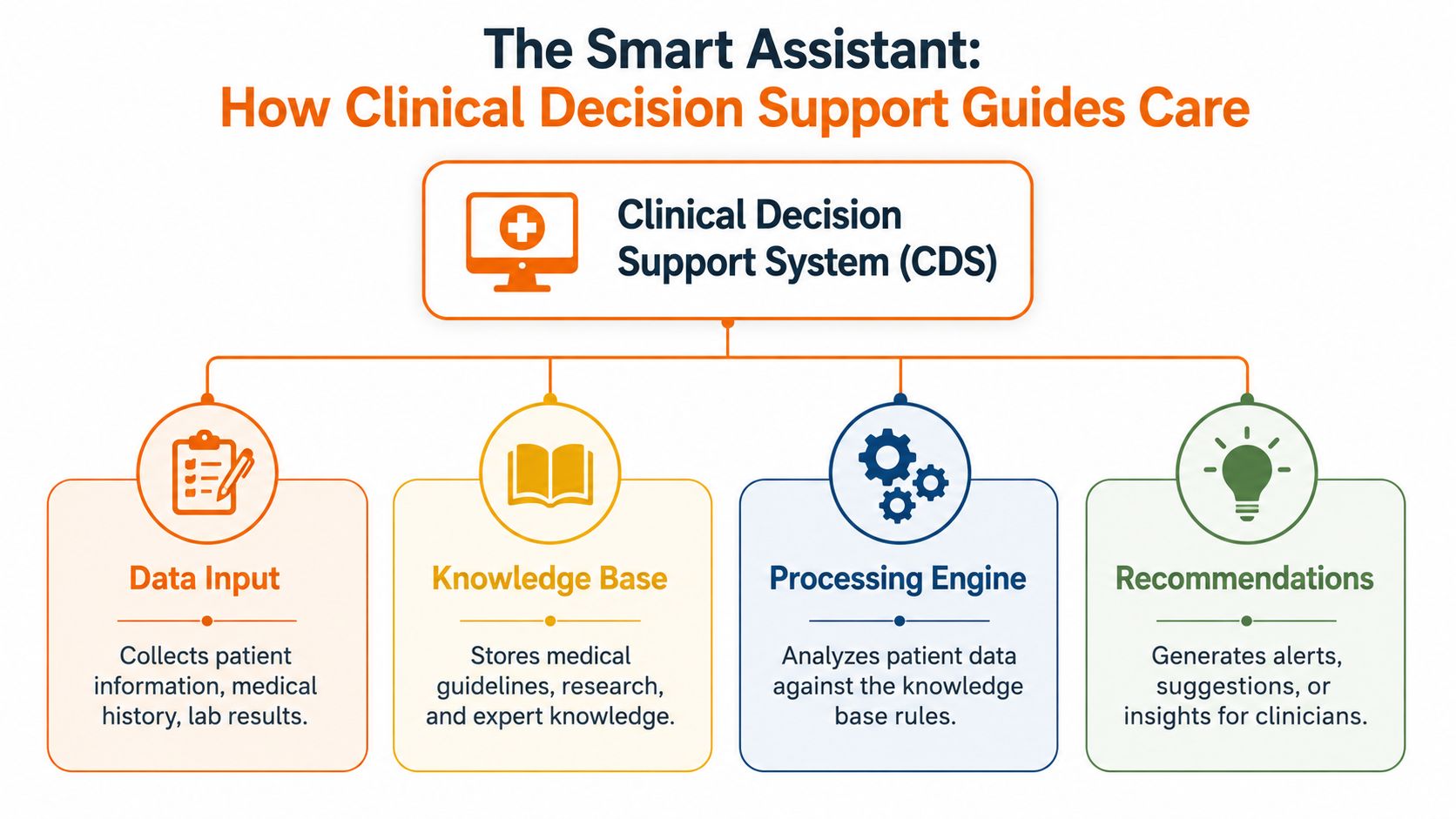
When an older adult checks off a medication, wears a device that tracks sleep, or logs blood pressure at home, CDS can take that input and compare it with a set of rules. If something stands out, the system presents a prompt, summary, or warning to the right person.
That flow is easier to follow if you break it into three parts.
The three parts behind the scenes
The knowledge base works like a cookbook. It stores the guidance the system uses, such as medication rules, care recommendations, timing ranges, or warning signs that may deserve attention.
The inference engine works like the person reading the recipe and checking the kitchen counter. It looks at the information coming in, compares it with the stored rules, and decides whether there is a match. If a missed medication check-in lines up with a recent change in sleep or activity, this is the part that notices the pattern.
The user interface is the part people see. It may be a message in a patient portal, a note in a care dashboard, a reminder on a device, or a summary a clinician reviews before a visit.
For families, that last step matters most. A good interface does not bury people in technical detail. It translates raw inputs into something understandable, such as “two doses were missed this week” or “walking activity has dropped from the usual pattern.”
How the system turns data into a useful prompt
CDS follows a simple sequence. It gathers information, compares that information with a rule, and then shows support if the rule applies.
At home, that might look like this. A daughter helping her father age in place sees that his evening medication was missed twice, his sleep schedule shifted, and his morning movement dropped. A CDS tool can connect those signals and raise a gentle flag so the family knows to check in before a small issue becomes a larger one.
That is one reason home-based tools matter. Many important health decisions happen between appointments, in kitchens, bedrooms, and living rooms, not only in exam rooms. For a broader look at how home and care data can connect, this overview of connected health solutions shows how these systems can support day-to-day care.
Why clean data matters
CDS depends on the quality of the information it receives.
Clear, organized inputs give the system a better chance of matching the right rule to the right situation. Messy, missing, or inconsistent inputs can lead to weak suggestions, missed warnings, or alerts that do not fit the moment.
That does not mean everything has to be perfect. It means the system works best when routines are tracked in a consistent way. At home, simple habits help. Logging medications the same way each day, using one device for blood pressure, or recording sleep on a regular schedule makes the pattern easier to read.
CDS works like a careful assistant for health. It does its best work when the notes it receives are clear enough to interpret.
Common Types of CDS for Health and Wellness
This section uses the AHRQ PSNet primer on clinical decision support systems at the point of care, which explains that CDSS can use diagnoses, lab results, and medication choices to create patient-specific recommendations and help people avoid issues such as allergies or drug-drug interactions without making the final decision.
CDS isn't one single tool. It's a family of tools that show up in different ways. Some are obvious, like an alert on a screen. Others are more like a checklist, a reminder, or a summary that helps someone decide what to do next.
The forms CDS can take
One common type is the alert. This is the digital version of a seatbelt reminder. Something important needs attention now. In healthcare, that may be a warning about a possible medication issue. In daily wellness routines, the same idea can show up as a prompt tied to timing, consistency, or a missed step.
Another type is the guideline prompt. Much like a recipe card clipped to the fridge, it helps someone follow a process in the right order. That can be useful when routines matter, such as tracking movement, sleep consistency, or home recovery habits.
A third type is decision support through summaries or trends. This feels less like an alarm and more like a dashboard. Instead of saying “stop,” it says, “Here's what has changed lately.”
Some of the most useful CDS doesn't interrupt. It quietly organizes information so a person can notice patterns sooner.
Types of Clinical Decision Support in Daily Life
| CDS Type | What It Does | Everyday Analogy |
|---|---|---|
| Alert | Flags something that may need quick review | A seatbelt reminder in a car |
| Reminder | Nudges someone about timing or follow-through | A calendar notification |
| Guideline prompt | Helps people follow a repeatable process | A recipe card for a familiar meal |
| Trend summary | Shows changes over time | A fitness app activity graph |
| Interaction check | Compares one detail against another to spot a conflict | A packing list that warns you what's missing |
A practical home-related example is mobility support. If someone's daily movement changes over time, a tool might not diagnose anything, but it can make that shift visible. Families exploring prevention-oriented home tools may also find value in this guide to fall risk assessment tools for 2026, especially when they want to understand how wellness monitoring supports steadier routines.
Practical CDS Examples for Aging in Place
Home is where CDS becomes personal.
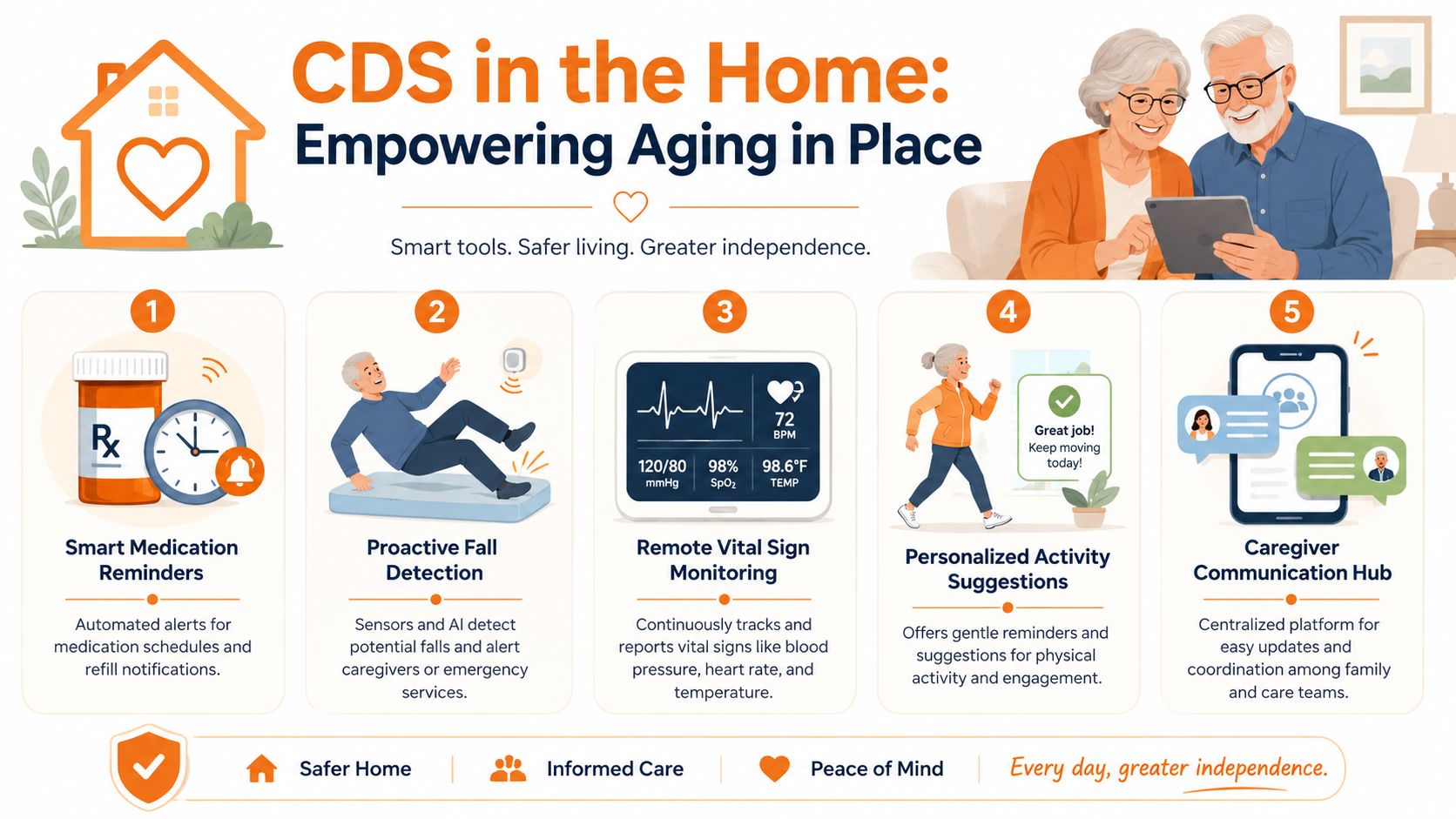
For an older adult living independently, clinical decision support often shows up as a helpful prompt, a simple trend view, or a shared update that keeps family members and clinicians on the same page. It works like a smart assistant for health. It does not replace judgment. It helps people notice what might otherwise be easy to miss.
At home it often looks helpful
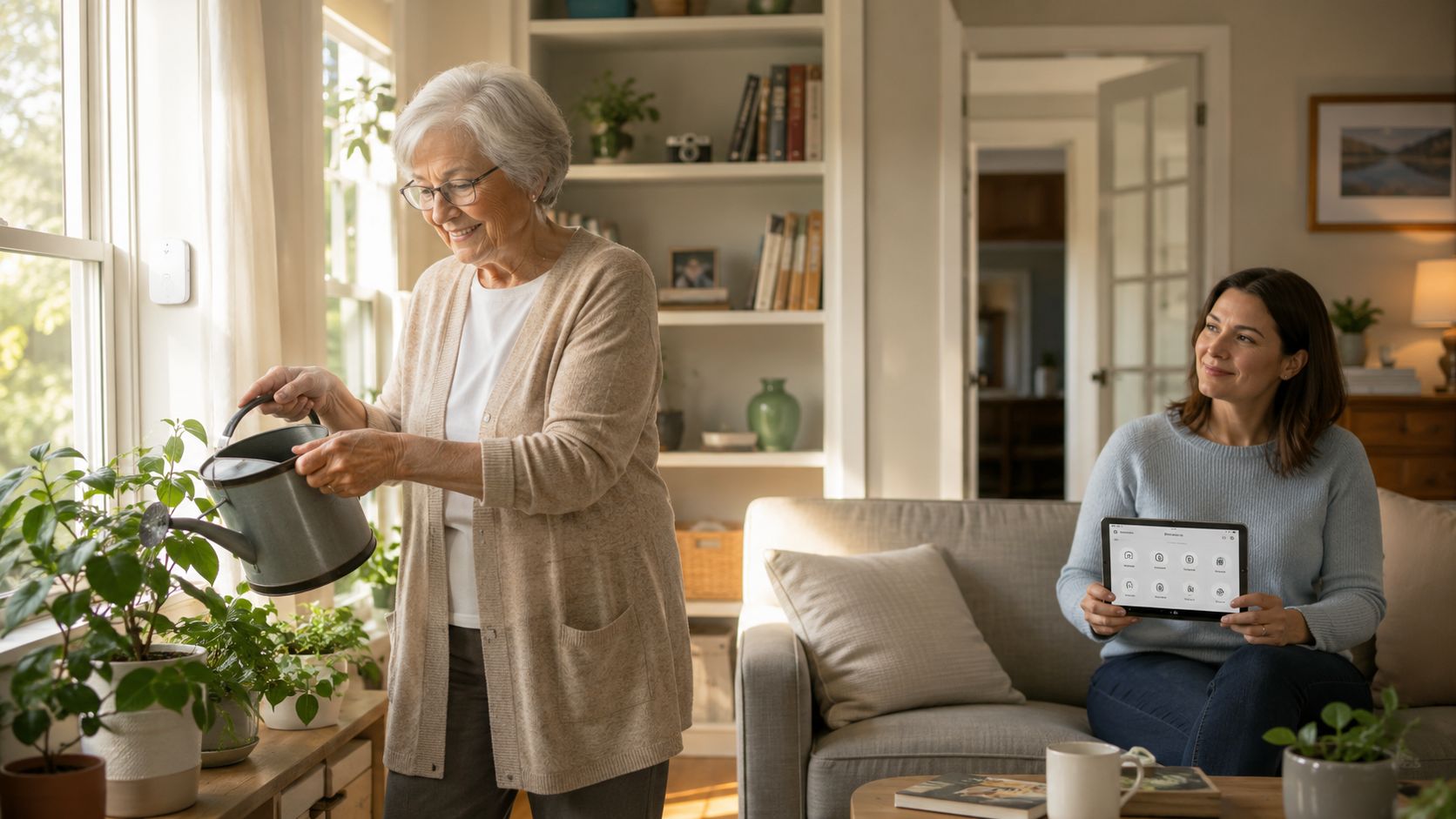
Consider a daughter checking in on her father from another town. She does not need a medical report every hour. She needs a clear signal that his usual routine still looks like his routine. CDS can help by organizing medication schedules, showing activity trends, and highlighting changes that may deserve a phone call or follow-up.
Medication support is one of the clearest examples. Research summarized earlier found that CDS can reduce the start of potentially inappropriate medications in older adults. At home, that may look like a tool that flags duplicate medicines, reminds someone about timing, or gives a clinician a cleaner picture of what the person is taking. The goal is simple. Fewer surprises and safer daily use.
Mobility is another strong example. A home system might notice that someone who usually walks to the kitchen, mailbox, or garden is moving less over several days. That pattern does not explain why the change happened. It does make the change visible, which gives a caregiver or clinician a better starting point for questions.
Small shifts matter.
A person may also become less engaged with regular habits such as meals, sleep, or social contact. A connected CDS tool can bring those changes into view early enough for a family member to check in before a small problem grows into a bigger one.
Why home use deserves more attention
Many explanations of CDS stay centered on hospitals and clinics. That misses a big part of real life for older adults who want to remain in familiar surroundings.
At home, CDS supports independence by reducing guesswork. A caregiver can open one shared view instead of piecing together calls, texts, and handwritten notes. A clinician can review organized home information instead of trying to reconstruct a week of changes from memory. An older adult can keep more control because support arrives through reminders and summaries, not just through urgent interventions.
Families exploring practical aging in place technology solutions often find that the most useful tools are the ones that blend into daily routines and make those routines easier to maintain.
A few realistic home examples include:
- Medication timing support: reminders when a dose may be late, plus a clearer record for review
- Activity pattern awareness: simple trend tracking for walking, movement, or general daily rhythm
- Caregiver coordination: one place for updates so relatives can respond to the same information
- Routine reinforcement: prompts for recurring tasks such as meals, hydration, sleep, or exercise
The best home CDS supports independent living and gives families clearer visibility, without making home feel like a hospital.
Understanding the Benefits and Real-World Challenges
A good CDS tool helps people notice what matters without turning daily life into a stream of warnings. For an older adult living at home, that can mean a simple prompt about a missed routine, a clearer summary for a daughter who checks in after work, or a better snapshot for a clinician reviewing changes over time.
Research in the JMIR study on clinical decision support and diagnostic efficiency found that CDSS use was linked with faster diagnostic confirmation and shorter hospital stays in that study setting. Those results come from clinical care, but the larger lesson also matters at home. Well-designed support can reduce guesswork, organize important details, and help families respond sooner.
What CDS can improve
The clearest benefit is better signal from busy information. Health routines produce lots of small details. Medication times, sleep changes, appetite shifts, activity levels, and symptom notes can be hard to hold in your head all at once. CDS helps sort those details into something people can use.
That matters for families caring from a distance.
Instead of asking, “Has anything been off this week?” a caregiver may be able to review a short summary of changes. Instead of trying to remember whether dizziness happened once or several times, an older adult may have a record that supports a more accurate conversation with a clinician. Instead of piecing together scattered updates, everyone can work from the same picture.
In practice, the benefits often look like this:
- Better timing: reminders or summaries can help people act before a small issue grows
- Less guesswork: patterns are easier to spot when information is organized
- Stronger communication: family caregivers and clinicians can review the same key updates
- More confidence at home: support tools can reinforce routines without making a person feel watched or controlled
Where people run into friction
The biggest problem is often too much noise. If a system sends alerts for every minor change, people stop paying attention. It works like a smoke alarm that goes off every time someone makes toast. The warning is still there, but trust in it drops.
Privacy is another concern, especially in the home. Families want plain answers to basic questions. Who can see this information? Where is it stored? Can access be limited to the right people? If those answers are vague, people may avoid the tool even if the features look helpful.
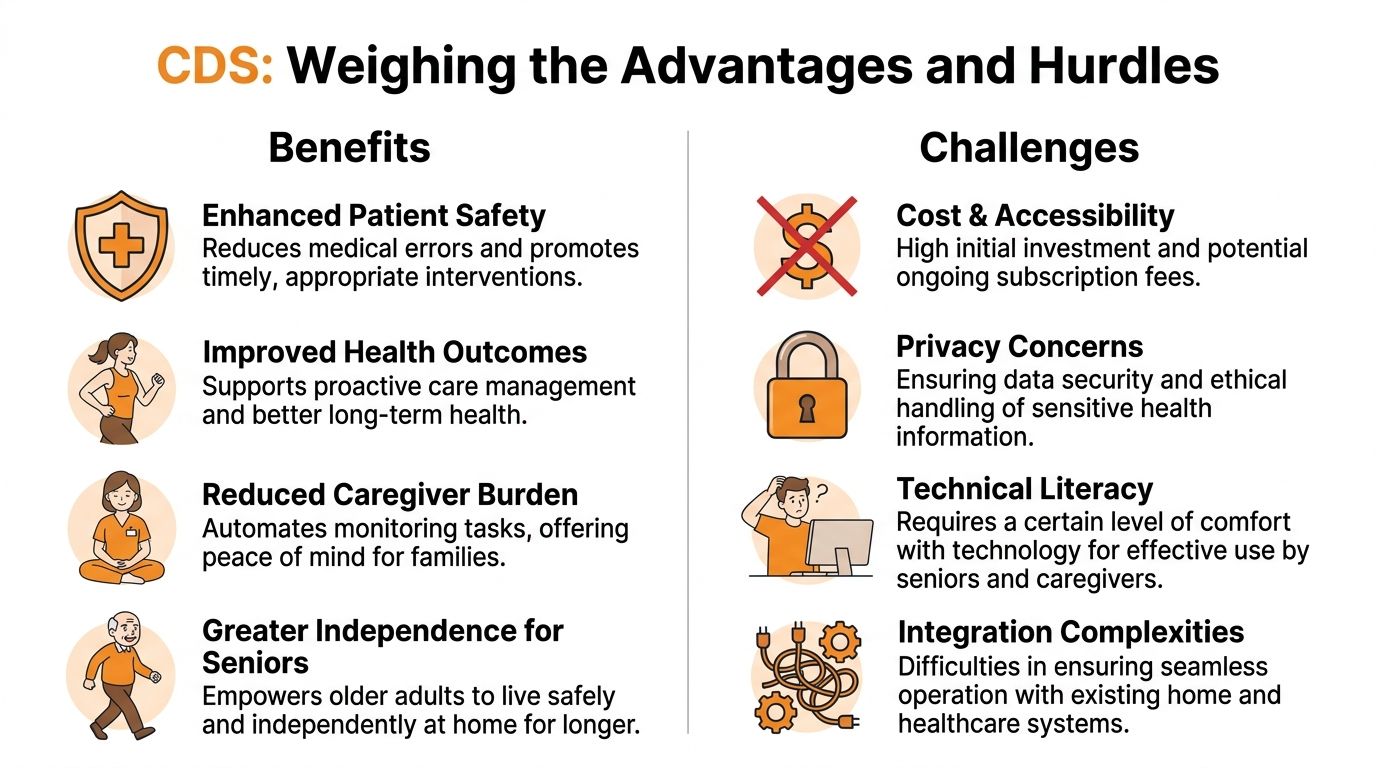
A third challenge is fit. A CDS tool may work well in a clinic and still feel awkward at home if the screens are confusing, setup takes too long, or family members have to jump between disconnected apps. Home support works best when it matches normal routines, technology comfort, and the way care is shared between older adults, relatives, and clinicians.
- Too many prompts: repeated alerts can lead people to ignore important ones
- Privacy concerns: users need clear rules about access, storage, and sharing
- Technical barriers: some people need larger text, simpler screens, and easier setup
- Poor connection between tools: scattered information weakens the value of the support
A strong CDS experience feels calm, relevant, and easy to understand. A weak one adds noise.
Actionable Steps for Patients Caregivers and Clinicians
A good CDS plan should feel less like adding another health app and more like adding a reliable helper to everyday life. For an older adult living at home, that might mean a reminder that appears at the right time, a simple screen that shows a change in sleep or blood pressure, or an alert a family member can understand without medical training.
Research noted earlier found that family-centered CDS is still far less common than clinic-focused tools, even though home-based designs can improve follow-through when they fit daily routines. That gap matters because aging in place happens in kitchens, bedrooms, and living rooms, not only in exam rooms.
Simple next steps
If you are an older adult, start small. Pick one part of your routine that feels harder to track than it should, such as medications, hydration, walking, or sleep. A helpful CDS tool should reduce guesswork and make the next step clear.
If you are a caregiver, look for a tool that works like a shared calendar plus a smart reminder system. You should be able to see what changed, what needs attention today, and what can wait for the next visit. If a tool creates more checking, more texting, and more confusion, it is not helping enough.
If you are a clinician, ask for home information in a format that supports quick judgment. A short pattern summary, such as missed doses over a week or a steady drop in activity, is often more useful than a stream of disconnected updates. Clear summaries help families stay involved without turning home care into constant monitoring.
One simple rule fits all three groups. Start with one problem, one tool, and one shared goal.
A short FAQ
Does CDS replace a doctor or caregiver?
No. CDS works like a smart assistant for health. It organizes information, points out patterns, and suggests what may need attention. People still decide what to do.
Is CDS only for hospitals?
No. Hospital systems get more attention, but CDS can also support independent older adults at home by helping with reminders, routine tracking, and communication with family or clinicians.
What makes CDS useful at home?
The best home tools are easy to read, easy to respond to, and built around normal habits. They support independence first, then make it easier to share the right update with the right person.
What should people look for first?
Clarity. A good tool answers simple questions fast: What changed? Does it matter? Who needs to know?
If you want a simpler way to stay connected around daily wellness, independence, and home support, Rx360 brings health insights, smart technology, and connected care into one experience built for older adults, families, and care teams. It's designed to support active living at home while keeping the right people informed without adding unnecessary complexity.
Lower-Risk Medication Plan Checklist
Below is a practical checklist and step plan you can implement into your daily life:
-
List all medications
Include prescriptions, over-the-counter drugs, supplements, sleep aids, creams, patches, eye drops, and inhalers.
-
Mark fall-risk drugs
Flag medicines that cause dizziness, sleepiness, confusion, blurred vision, low blood pressure, or low blood sugar.
-
Ask for a medication review
Bring the list to a pharmacist or prescriber.
-
Review after any warning sign
Request a new medication check after a fall, near-fall, new prescription, dose change, dizziness, or confusion.