You've had a wellness app on your phone for a while now. It counts steps after your morning walk, shows how you slept, and sends a gentle update to your daughter when you've finished your routine. That's helpful, positive support for aging in place. Then a simple question pops up. How long does all that information stay stored, where else does it live, and who decides when it's gone? That's exactly what data retention policies are meant to answer, in plain language you can use.
Table of Contents
- Why Data Retention Policies Matter at Home
- The Retention Schedule for Connected Care Data
- Laws That Set How Long You Keep Data
- Why Retention Is Not the Same as Deletion
- Who Controls the Data as Circumstances Change
- Archival and Secure Deletion Methods Compared
- How to Build Your Retention Policy This Week
Why Data Retention Policies Matter at Home
Three years of step counts, sleep patterns, balance readings, and alert history are sitting in a wellness app's storage, and nobody has decided what happens next. The information supported an independent older adult's daily routine, but keeping it forever was never part of the plan. That quiet pile of old records is exactly the problem a retention policy solves.
The UK Information Commissioner's Office storage limitation guidance describes a retention schedule as a record of the information you hold, why you use it, and how long you plan to keep it. The same guidance makes a second point that often gets missed: there is no single correct period. Each category of data needs its own justified purpose, and "it might be useful someday" is not a reason to keep something indefinitely.
A retention policy works like the labels on pantry shelves. Every item is there for a reason, every item has a date, and nothing stays just because the shelf has room. Throwing out today's groceries would be just as careless as keeping last year's.

So how often does a schedule run on its own? The IAPP 2025 analysis citing the IAPP Privacy Governance Report 2024 reported that in 2024, fewer than 50% of organizations surveyed had fully or semiautomated data-retention processes. Many platforms still depend on someone remembering to delete.
Three Reasons This Matters for Connected Care
- Less exposure if something goes wrong: Keeping only what's needed means less personal information is at risk in a breach.
- Clear purpose: The platform has to say why it collected sleep, exercise, or mobility data in the first place.
- Straight answers for families: You, your loved ones, and your care team can ask how long information exists and get a specific reply.
A policy is a set of rules, one per type of data, each with a review point and an end state. Two separate jobs hide inside that end state. Retention decides how long a record stays in use. Deletion decides what happens to every copy, including the versions sitting in backups, log files, and reports already shared with a caregiver or clinic. A schedule that covers the app's main database but forgets its backups is only half a schedule.
When identifying the person is no longer necessary, the information can be anonymized so it no longer points back to them.
This article is general information, not legal advice. Rules differ by place and situation, so check your own circumstances with a qualified professional.
Start by listing every place your data is created, such as devices, apps, reports, and messages. Then add where copies travel, like downloaded summaries or shared alerts. Next to each entry, write what it is for. That short list is the beginning of a real schedule.
The Retention Schedule for Connected Care Data
The guidance in this section comes from the European Commission page on GDPR principles, which explains the storage-limitation principle. Personal data should be kept for the shortest period necessary for its stated purpose, with explicit time limits to erase or review records. Longer retention needs a valid basis, such as a legal obligation or research with safeguards like anonymisation.
The common mistake is one global period for everything. Raw sensor readings, friendly summaries, caregiver notifications, clinical records, audit logs, identity data, and backups don't serve the same purpose, so they shouldn't share the same expiry date. Separate schedules keep data retention policies honest and practical.
How to Read the Schedule
Each row below is one data class. Read across for its purpose, the event that ends retention, and who owns the decision. If a platform shows you a schedule and a cell is vague, that's a signal it needs a documented legal or policy decision, not a guess.
| Data class | Main purpose | Expiration trigger | Owner |
|---|---|---|---|
| Raw wellness telemetry | Trend detection and device health | Stated purpose ends or account closes | Product and data lead |
| User-facing summaries | Showing the older adult their own activity | Account closure or deletion request | Product lead |
| Caregiver notifications | Timely updates to chosen family members | Consent withdrawn or care relationship ends | Privacy officer |
| Clinical records | Coordination with care providers | Period set by applicable state medical records rules | Clinical compliance lead |
| Audit logs | Proving who viewed, changed or exported data | Period set by documented legal and security review | Security lead |
| Account-identifying data | Sign-in and identity checks | Account closure, after any legal exceptions | Account operations |
| Backups and snapshots | Disaster recovery | Written backup expiry date in the backup schedule | Infrastructure lead |
Start at the top. Raw wellness telemetry is the high-frequency stream behind step, sleep, and movement trends. Keeping it indefinitely increases the amount of personal information exposed to breach and to access or deletion requests, without necessarily improving care.
User-facing summaries are different. They're the readable view you check after a walk or a good night's sleep, so they follow your account relationship. Caregiver notifications follow consent and the care relationship, which means they can end earlier if you change who receives updates.
Clinical records sit under their own rules because care providers use them for coordination. Audit logs aren't wellness content at all. They're proof of who viewed, changed, or exported data, so security and legal reviewers set that period.
The Five Elements Every Class Needs
- Named owner: One person or role answers for the decision.
- Documented purpose: A short, specific reason, not "just in case."
- Expiration trigger: An event a system can check, like account closure.
- Review date: A date to confirm the purpose still applies.
- Deletion or anonymisation method: What actually happens at the end.
For example, say a fall-detection pendant creates raw readings. Those readings may support trend analysis under a defined purpose, while the alert and the caregiver notification are kept only as long as the care relationship requires. An automated lifecycle job can mark records for deletion when the purpose ends, route exceptions through legal-hold approval, and record an auditable disposition event.
If you're learning how these pieces fit together, this overview of connected health solutions shows the kinds of devices and services that create these data classes. Notice how each service creates a different kind of record.
Quick test: Pick one data class and ask two questions. Who owns it, and what event ends it? If nobody can answer, the schedule isn't ready yet.
Anonymisation also needs care. Taking data offline isn't deletion if identifiers remain recoverable. A good process tests whether someone could re-identify a person from what's left.
Laws That Set How Long You Keep Data
The California information in this section comes from the California Attorney General CCPA page, and the HIPAA points below point to the HHS HIPAA guidance and to each state's medical records statute. No single law sets one universal retention period for connected-care data. That's the part that confuses people most, and it's normal to find it untidy.
In US healthcare operations, HIPAA doesn't itself prescribe how long medical records must be retained. State law generally governs that period. HIPAA does require safeguards for protected health information for as long as it's maintained, including disposal.
Separate from care records, HIPAA documentation such as privacy policies and required records generally has a six-year retention requirement. Treat that six-year figure as a general pattern to check for documentation, not as a fixed rule for every wellness record. Operational health data and compliance evidence need distinct schedules.
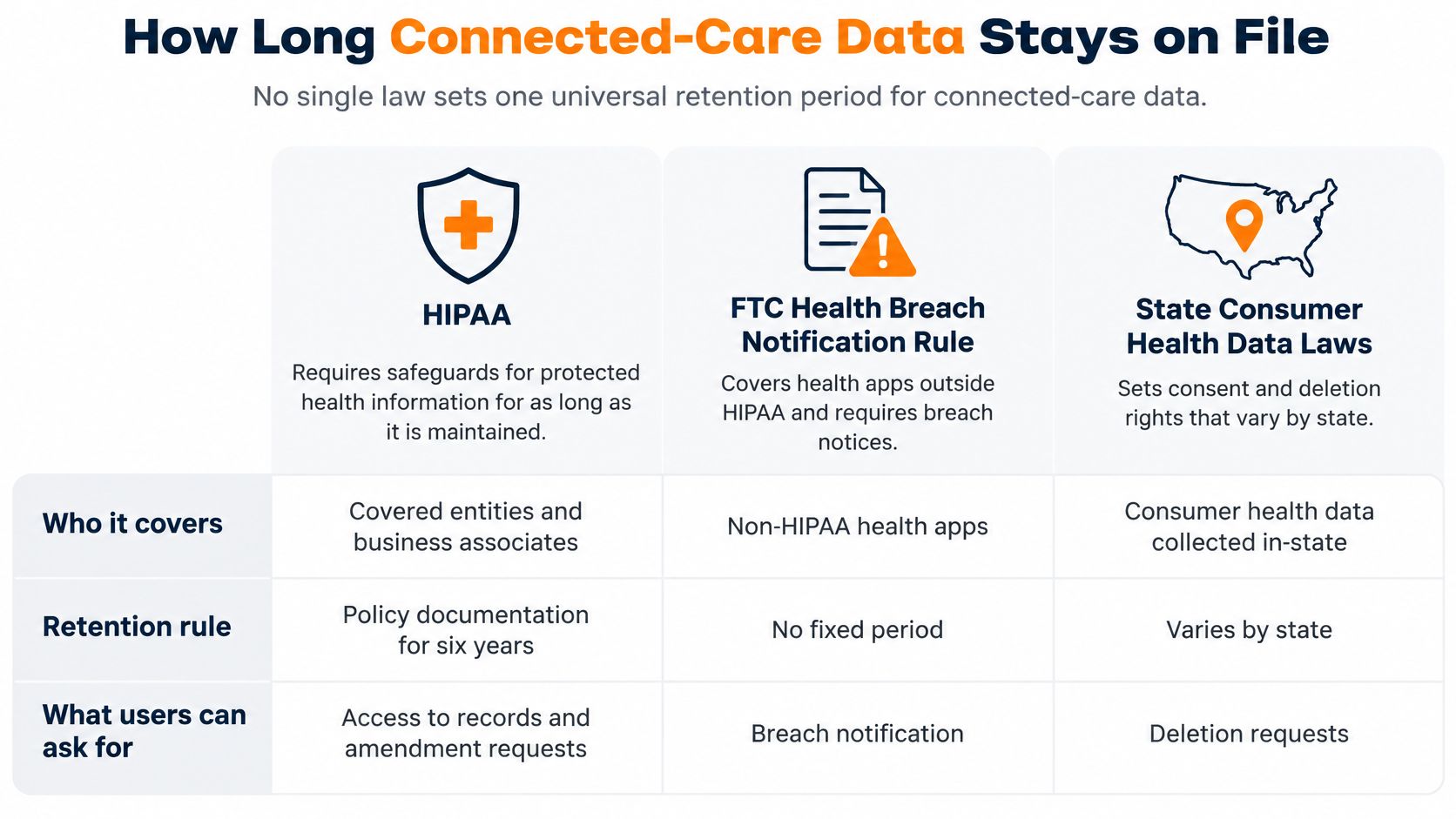
| Regime | Where it applies | What it says about keeping data | Deletion or response timing |
|---|---|---|---|
| HIPAA | US healthcare operations | Does not set how long medical records must be kept; requires safeguards for protected health information for as long as it is maintained, including disposal | No fixed deletion window in HIPAA itself |
| HIPAA documentation | US covered entities | Privacy policies and required records generally kept for six years | Six years (generally) |
| State medical record rules | Individual US states | Set the required keeping period for medical records, set state by state | Set by each state's statute |
| GDPR storage limitation | EU organizations | Keep personal data no longer than needed for its stated purpose, unless a defined exception applies | Erase or review at defined time limits |
| UK GDPR storage limitation | UK organizations | No universal period; each data category needs a justified period | Anonymize once identification is no longer necessary |
| CCPA | California consumers and businesses | Verifiable deletion requests must be honored, with listed exceptions including legal retention | Respond within 45 days |
Under California's Consumer Privacy Act, a consumer may request deletion of personal information a business collected. On a verifiable request, the business must delete the information from its records, notify service providers or contractors to delete it, and generally respond within 45 days, with exceptions such as legal retention.
Say a California resident requests deletion, but a clinical record must still be kept under a state rule. The platform deletes what it can, keeps the required record, and explains the exception in writing. That's clearer and kinder than a flat yes or no.
If HIPAA is new to you, this plain-language guide to what HIPAA compliance means can help you separate safeguards from retention periods. Map where your users live before you finalize any schedule, because each location brings its own rules. Then check those rules with a qualified lawyer.
Why Retention Is Not the Same as Deletion
An older adult closes an account. The live record vanishes from the app, and it feels finished. Yet a clinician's exported PDF, a caregiver's email notification, an audit log, and a disaster-recovery backup may still exist. Retention is how long data is kept. Deletion is what removes every recoverable copy.
That's why a copy map helps. It lists production storage, replicas, snapshots, archives, device caches, exported reports, and disaster-recovery media. Without that map, "deleted" can mean only "deleted from the screen you're looking at."
The technical guidance here comes from NIST Special Publication 800-209, which notes that retention requirements apply to backup copies. It also says encryption keys must be protected for a comparable duration or archived data should be re-keyed, and keys and backed-up data shouldn't be stored together. NIST also recommends controls against unauthorized deletion, including deletion-specific multifactor authentication and locked objects where supported.
A 2025 survey in The State of Backup and Recovery Report 2025 found that 44% of organizations backed up data to public-cloud services, while about 40% used archive capabilities in backup tools to retain former employees' data. You can see why deleting from an app doesn't always remove every copy at once.
Legal Holds and Exceptions
A legal hold pauses deletion for a defined reason, such as a dispute or investigation. It isn't a blank check. A good record shows who approved it, why it exists, and when it ends. Backup expiry, cryptographic-erasure procedures, and restore testing should also be documented, so a restored backup doesn't bring deleted data back without anyone noticing.
Ask any platform three friendly, specific questions. Where do copies of my data live after I delete it, how long do they persist, and what proof will I receive?
For HIPAA and state timing, use the comparison table in the laws section as your reference point. Here, the main lesson is simpler. Good data retention policies describe copies, not just the main database.
Who Controls the Data as Circumstances Change
Who should decide what happens to data when memory, health, or family relationships change? The research and framing in this section come from a 2025 article in JMIR Aging on digital health technologies for older adults. It identifies privacy, autonomy, informed consent, overdiagnosis, and provider workload as persistent challenges, and notes people with cognitive impairment may struggle to understand consent for continuous monitoring.
Consent isn't a one-time checkbox. It's a time-bounded, purpose-specific permission that can change as routines and needs change. That matters for sleep, exercise, mobility, and social connection data collected at home.
Four Roles to Keep Straight
- The older adult: Can give, change, or withdraw consent, and should be able to override a caregiver's view.
- A family caregiver: Can view updates the older adult has agreed to share, such as a note that a morning walk happened.
- Clinicians: Use records for care coordination with the older adult's care team.
- Administrators and care coordinators: Set policy, run audit logs, and handle access and deletion requests.
The 2025 study reported older adults were highly willing to share passive sensor data with healthcare providers, at 80% regularly and 81% when sick or recovering, and with family members at 71% in both circumstances. It also emphasized there's no one-size-fits-all sharing model, and participants didn't want to feel watched or lose control. Willingness to share isn't the same as giving up control.
Sharing also isn't the same as retaining. A record may stay for clinical or legal reasons while family visibility is reduced or stopped. For example, you might stop daily activity updates to a relative after a family disagreement, while the underlying record remains under its schedule.
A clear policy should specify who approves retention, who can request deletion, how capacity and proxy authority are verified, how the older adult can override a caregiver, and how emergency access expires. Transitions after hospitalization, cognitive decline, death, or caregiver conflict need answers before they happen. For background on how care records are organized in the first place, this explainer on what electronic health records are is a helpful starting point.
Audit logs are the proof layer. They record who viewed, changed, exported, or deleted data, and when. Logs need their own retention schedule, because they contain personal information too.
At its best, a good policy protects positive routines, independence, and the social connections you choose to keep. It lets you change who sees your information as your needs change, without losing the support that helps you live at home.
Archival and Secure Deletion Methods Compared
The methods in this section draw on NIST guidance on backups, keys, and disposal, and on the California CCPA statute text for deletion mechanics. At the end of retention, teams don't have just one tool. They can erase, deidentify, destroy keys, let backups expire, or pause deletion under a legal hold.
The California statute says a business can comply with a deletion request by permanently and completely erasing personal information from existing systems, except archived or backup systems, or by deidentifying or aggregating it. The business still has to address the information through one of those listed methods. A backup exception isn't unrestricted indefinite retention.
| Method | Best for | What it does | Watch out for |
|---|---|---|---|
| Permanent erasure from live systems | Active production data | Removes records from current databases | Backup and replica copies may still hold the data |
| Deidentification or aggregation | Trend data kept after account closure | Strips identifiers or combines records into totals | Must be tested against re-identification risk |
| Cryptographic erasure | Encrypted backups and archives | Destroys the encryption keys so the data cannot be read | Keys must be stored apart from the backed-up data |
| Re-keying archives | Long-term archives kept for a required period | Re-encrypts the data under new keys before old keys are retired | Needs a documented, tested process |
| Backup expiry or overwrite | Routine backup copies | Lets old backups age out on a set schedule | The recovery window must be written down |
| Legal hold | Records under dispute or investigation | Pauses deletion for a defined reason | Needs approval, a reason and an end date |
Permanent erasure suits live systems, but it doesn't chase copies into backups. Deidentification or aggregation can suit trend data, such as combined step totals, after an account closes. It needs a re-identification test, because removing a name alone may not be enough.
Cryptographic erasure works differently. Say a caregiver note sits in an encrypted backup. If the encryption key is destroyed and no copy of the key remains, the note can no longer be read, even though scrambled data remains for a time.
Re-keying is for archives that must stay readable for a required period. The data is re-encrypted under new keys before old keys retire. Backup expiry lets routine copies age out on a written schedule, while a legal hold pauses the whole process for a documented reason.
Taking data offline is not the same as deletion if identifiers can still be recovered.
A sensible order is live data first, then backups, then logs and exports. Strong data retention policies name that order in advance, so nobody improvises during a stressful request.
How to Build Your Retention Policy This Week
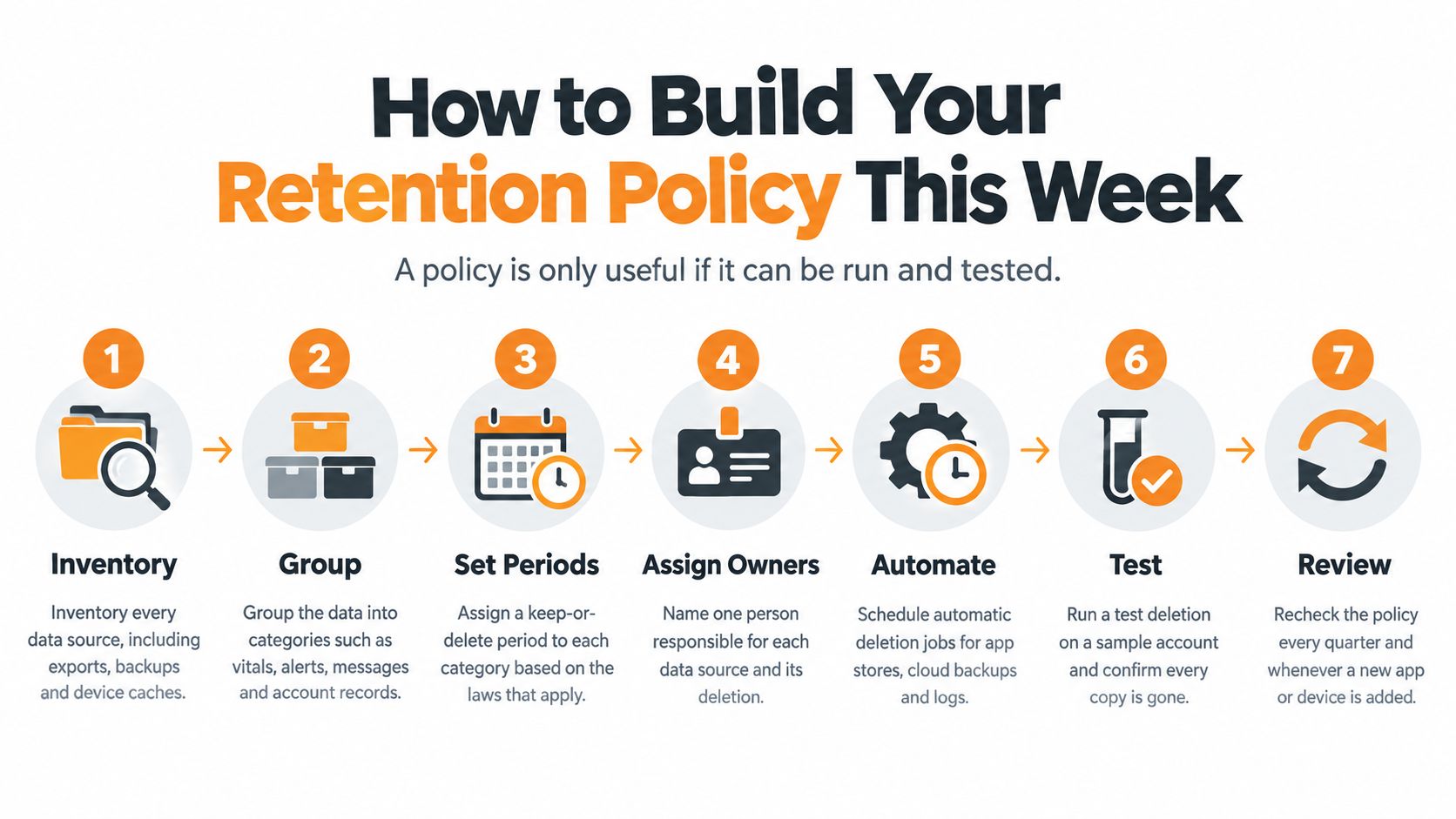
A policy is only useful if it can be run and tested. You don't need to finish everything in one sitting. Start with one app, one device, or one family account, and work through the steps in order. A good policy works like a house rule for data: decide what may stay, where copies hide, who may act as consent or capacity changes, and when each copy must leave.
Seven Practical Steps
- Inventory every data source. Include apps, devices, exports, backups, messages, and device caches. You can't set an expiry date for copies you haven't found.
- Group data into classes. Use the schedule table as a starting point, with separate rows for telemetry, summaries, notifications, records, logs, identity data, and backups.
- Assign an owner and purpose. Write one short purpose for each class, such as supporting sleep routines or keeping family updated after exercise. Name who can approve changes if the older adult later withdraws consent or a caregiver gains legal authority.
- Set an expiration trigger and review date. Choose an event a person or system can check, like account closure, consent withdrawal, a device replacement, or the end of a recovery window.
- Choose a deletion or anonymization method. Pick from the comparison table and note what happens to live data plus backups, exports, keys, logs, and downstream recipients.
- Map legal exceptions and legal holds. Work with a qualified lawyer on state rules and laws that apply where users live, and write down how exceptions are approved, paused, and ended.
- Test one deletion request end to end. Follow it through live systems, downstream recipients, and backup expiry, then save the confirmation record.
A Checklist You Can Save
- Every class covered: Each one has an owner, a purpose, and a trigger.
- Copies included: Backups, replicas, exports, keys, and caches appear on the copy map.
- Control is current: The record shows who may request, approve, or receive updates as consent and capacity change.
- Logs scheduled: Audit logs have their own retention and deletion rule.
- Proof saved: Every deletion produces a record the older adult or authorized caregiver can keep.
If you're comparing connected-care platforms such as Rx360, ask for the retention schedule, the copy map, and a sample confirmation record before you decide. Keep the questions neutral and compare several options. You're looking for clear, factual answers that support independence, positive routines, and staying connected on your terms.
Good data retention policies don't make home life more complicated. They make the technology behind it easier to understand, easier to change, and easier to trust. Start with your list this week, and you'll already be ahead of "we keep everything forever."
If you're exploring connected support for aging in place, visit Rx360 to see how health insights, smart technology, and connected care can help independent older adults stay aware of daily wellness signals while loved ones receive timely updates, with clear information and thoughtful privacy choices that support the routines, independence, and family connection you want at home.
Lower-Risk Medication Plan Checklist
Below is a practical checklist and step plan you can implement into your daily life:
-
List all medications
Include prescriptions, over-the-counter drugs, supplements, sleep aids, creams, patches, eye drops, and inhalers.
-
Mark fall-risk drugs
Flag medicines that cause dizziness, sleepiness, confusion, blurred vision, low blood pressure, or low blood sugar.
-
Ask for a medication review
Bring the list to a pharmacist or prescriber.
-
Review after any warning sign
Request a new medication check after a fall, near-fall, new prescription, dose change, dizziness, or confusion.